FXPHD - VFX308 - Battle for Bazoches VFX Project
巴佐什战役影视特效项目课程。使用软件:3DEqualizer,maya,nuke,DaVinci Resolve。43.6GB。
我们最新的项目式课程将逐步讲解一个场景,从概念到最终完成,并在我们的私人 Slack 频道中进行讨论。课程将每周或每两周发布一次,涵盖从素材准备到摄影测量、动画、特效等各个方面。
课程将由参与该镜头制作的多位艺术家根据其各自领域的专长进行授课。Charles Chorein 是整个项目和许多课程的负责人,他是一位驻扎在伦敦的视觉特效总监,多年来为我们教授过许多课程。
课程列表
课程一:课程概述
视觉特效总监 Charles Chorein 和 fxphd 联合创始人 John Montgomery 简要概述了课程内容。
课程二:概念艺术
概念艺术家 Aurélien Ronceray、Charles Chorein 和 John Montgomery 讨论了该项目的概念艺术创作过程。
第三节课:摄像机追踪 - 3DEqualizer 第一部分
我们根据无人机传感器和焦距搭建了 3DEqualizer 项目,并使用在另一节课中通过 Reality Capture 生成的激光雷达 3D 网格来帮助我们对准 3D 摄像机(课程的 Reality Capture 部分稍后介绍)。
第四节课:摄像机追踪 - 3DEqualizer 第二部分
基于激光雷达开始校准后,我们添加了更多追踪功能,以便能够“在 3D 模型上投射点”来对准我们的 3D 城堡。最终,我们将摄像机置于 3D 空间中并调整摄像机焦距。
第五节课:摄像机追踪 - 3DEqualizer 第三部分
图像控制窗口是一个强大的工具,它可以通过色度、曲线和颜色控制来操作图像,从而能够显示和聚焦原始图像中不清晰的特定细节。这有助于我们的 2D 轨迹在追踪过程中更好地“贴合”并保持更一致的效果。
第六课:摄像机追踪 - 3DEqualizer 第 4 部分
镜头畸变是 3D 追踪过程中的一个重要环节,因此我们将研究 3DEqualizer 的工具如何进行调整并创建精准的追踪。此外,我们还会对追踪进行快速质量检查,并将其导出到 Maya。
第七课:摄像机追踪 - 3DEqualizer 第 5 部分
使用 Nuke 中的“镜头畸变插件套件”对底片进行去畸变处理,并导出可在 Maya 中使用的 JPEG 序列。
第八课:文件准备 第 1 部分 - 组织和结构
本课程项目结构概述。所有文件夹、工作文件和已发布的文件都必须以特定的方式进行组织和命名,以便高效地完成项目。
第九课:文件准备 第 2 部分 - Resolve 和色彩管理
在 Resolve 中使用色彩管理设置我们的项目。如何在 Resolve 和 Maya/Nuke 之间使用 ACES 以避免视觉特效工作流程中出现任何信息丢失或色彩问题。
课程 10:文件准备(第三部分)- Resolve 和 Nuke 中的 LUT
在 DaVinci Resolve 中使用 DJI Mavic 2 Pro LUT,并研究它如何与我们的 ACES 工作流程以及 Nuke 中的 OCIO Transform 节点配合使用以匹配 LUT。使用 ACES 的难点之一是保持软件之间的一致性。
课程 11:文件准备(第四部分)- 将 CG 灯光与 Plate 匹配
创建 Nuke 模板,将图像序列输出为不同分辨率的 EXR、JPEG 和 QT 格式。使用 3DEqualizer 和 Maya 的镜头畸变流程。
课程 12:Blender 与概念创作
Aurélien Ronceray 再次讲解他如何使用 Blender 进行概念创作。
第 13 课:HDRI,第一部分
我们分析使用数码单反相机和 8mm 鱼眼镜头在拍摄现场拍摄的图像,并确定在拍摄过程中需要哪些步骤才能最有效地使用 PTGui 创建 HDRI。然后,我们在 PTGui 中使用包围曝光图像创建 HDRI,并将它们拼接成经纬度 HDR 最终图像。如何使用控制点来改善或帮助某些图像之间的拼接。
第 14 课:HDRI,第二部分
在 Nuke 中清理环境光和阳光,以便创建灯光装置。在 Nuke 中使用 mmColorTarget 工具调整白平衡并中和 HDRI。
第 15 课:HDRI,第三部分
我们的 HDRI 已准备好在 Maya 中使用。但是,为了能够创建稳定的 lightRig 并根据拍摄地点匹配光照,我们需要在 Nuke 中使用 mmColorTarget 工具调整白平衡并中和灰色/铬色球体和麦克白图表。现在我们可以进入 Maya,用城堡激光雷达、麦克白图表和灰/铬球设置我们的 CG 场景了。
第 16 课:HDRI,第 4 部分
我们分析底片,并力求匹配我们的 CG 灯光,以便在 Maya 中复制相同的灯光效果。设置的一部分是创建两个不同的通道,使用基本的 AOV 并进行覆盖,就像我们在制作中所做的那样。
第 17 课:HDRI,第 5 部分
我们使用 3D 摄像机在 Nuke 中创建设置,并创建一个 CG 灯光合成,以便比较现场的真实灯光和我们在 Maya 中创建的 CG 灯光。我们进行必要的调整,以尽可能地匹配底片。
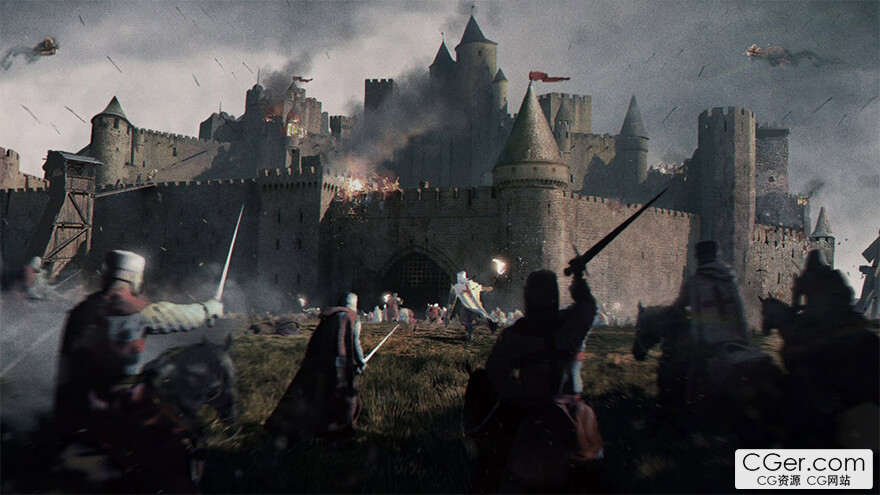
Our latest project-based course will work through a scene over time from concept to completion, supplemented with discussion in our private Slack channel. Classes will be released weekly or bi-weekly, covering all aspects of the shot from footage prep to photogrammetry to animation, effects, and more.
The classes will be led by a variety of artists who contribute to the shot, based upon their specialty in the field. Leading the overall project and many of the classes is Charles Chorein, a London-based VFX supervisor who has taught many courses for us over the years.
Class Listing
Class 1: Overview of the course
VFX supervisor Charles Chorein and fxphd co-founder John Montgomery provide a brief overview of what's to come in the course.
Class 2: Concept Art
Concept artist Aurélien Ronceray, Charles Chorein, and John Montgomery discuss the concept art process for the project.
Class 3: Camera Tracking - 3DEqualizer Part 1
We set up the 3DEqualizer project based on our drone sensor and focal length and use our LIDAR 3D mesh generated on another class with Reality Capture to help us lining up our 3D camera (the Reality Capture section of the course comes later),
Class 4: Camera Tracking - 3DEqualizer Part 2
Having started the calibration based on our LIDAR, we add more tracking to be able to “project points on 3D models” to line up our 3D castle. As a result, we have the camera in our 3D space and adjust the camera focal length.
Class 5: Camera Tracking - 3DEqualizer Part 3
The Image Control Window is a powerful tool to manipulate our images with chroma, curve, and color controls to be able to reveal and focus on specific details that aren't clear in the original image. This helps our 2D tracks "stick" better and be more consistent during the tracking process.
Class 6: Camera Tracking - 3DEqualizer Part 4
Lens distortion is an important part of the 3D tracking process, so we examine how 3DEqualizer's tools are able to adjust for this and create an accurate track. Also, rendering a quick quality check of the track and exporting for Maya.
Class 7: Camera Tracking - 3DEqualizer Part 5
Using the “Lens Distortion Plugin Kit” in Nuke to un-distort the plate and export a jpeg sequence for use in Maya.
Class 8: File Prep Part 1 - Organization and Structure
An overview of the project structure for the course. All folders, working files, and published files has to be organized and named in a specific way to be able to work through the project efficiently.
Class 9: File Prep Part 2 - Resolve & Colour Management
Setting up our project in Resolve with colour management. How to work with ACES between Resolve and Maya/Nuke to avoid any lost information or colour issues in our VFX workflow.
Class 10: File Prep Part 3 - LUTs in Resolve & Nuke
Using the DJI Mavic 2 Pro LUT in DaVinci Resolve and examining how it works with our ACES workflow and our OCIO Transform node in Nuke to match the LUT. One of the tricky things with ACES is to keep consistency between software.
Class 11: File Prep Part 4 - Matching CG Lighting with the Plate
Creating a Nuke template to output our image sequence to EXR, JPEG and QT with different resolutions. Lens distortion pipeline with 3DEqualizer and Maya.
Class 12: Blender and Concept Work
Aurélien Ronceray returns to walk through how he uses Blender to workin on concepts.
Class 13: HDRI, Part 1
We analyze images taken on location with our DSLR and fisheye 8mm and figure out what needs to be done during the shooting to create our HDRI with PTGui on the most efficient way. Then we create our HDRI in PTGui with the bracketed images and stitch them in a latlong HDR final image. How to use Control Points to improve or help the stitch between certain images.
Class 14: HDRI, Part 2
Cleaning up the environment light and the sunlight in Nuke to be able to create our light rig. Adjusting white balance and neutralizing our HDRI with the mmColorTarget gizmo in Nuke.
Class 15: HDRI, Part 3
Our HDRI is ready to be used in Maya. However, to be able to create a solid lightRig and match the lighting based on location we need to adjust our white balance and neutralise our grey/chrome balls and macbeth chart using mmColorTarget gizmo in Nuke. Now we are able to jump into Maya and setup our CG scene with the castle LIDAR and Macbeth chart and grey/chrome balls.
Class 16: HDRI, Part 4
We analyze the plate and aim to match our CG lighting to be able to replicate the same lighting in Maya. Part of the setup is to create two different passes with basic AOV's and overwrite like we will do in production.
Class 17: HDRI, Part 5
We create a setup in Nuke using our 3D camera and create a CG lighting slap comp to be able to compare our real lighting on location and our CG lighting created in Maya. We make the adjustments needed to match as close as possible the plate.
描述:
标签: 影视 特效 后期 教程分类:教程 > 3D教程 > 其他3D教程
发布:CGer | 查看: | 发表时间:2025/10/12 20:16:42 | 更新时间:2025/10/12 20:26:00
○ 充值或账号问题请【点击这里联系站长】 |


点击解锁当前付费资源,消耗 90 CG 点(约9.0 元), 24小时内有效(有效期内不重复扣点)
—————————————————————————————————————————————— | ||
| 哪些资源会被列为付费资源? ●站长付费购买的资源,站长从其他途径付费购买的资源。 ●资源包体积巨大,需要大量时间上传,占用大量存储空间的资源。(目前超过10GB的资源可能会列为付费资源) ●内容经常被某些人倒卖并恶意举报的资源,收费可以减少恶意举报的概率。 ●稀少的和高质量的资源。 |



| 常见问题,点击查询: | ||
| ●CGer(Cg儿)资源下载帮助 | ||
| ●资源名词解释 | ||
| ●注册/登陆问题 | ||
| ●充值出错/修改密码/忘记密码 | ||
| ●充值赠送系统 | ||
| ●文件解压出错/解压密码 | ||
| ●Payment with Paypal | ||
| ●哪些资源会被列为付费资源 | ||
| ●为何要充值解锁 | ||
| ●免责条款 | ||
| ●联系站长(联系站长前请先仔细阅读 免责条款 ,网站只提供资源,不提供软件安装等服务!) | ||