Curic measure++ v1.0.2 for SketchUp (WinMac)
Curic measure++ 使用 Overlay API(SketchUp 2023 及更高版本)在鼠标悬停时直接显示测量结果。
以下是它的一些功能:
显示对象尺寸(长度、宽度、高度)并识别基本形状,例如长方体、圆柱体或条形。
像激光一样测量对象之间的净空。
通过投射反向光线测量对象厚度——适用于墙壁、面板和楼板。
测量对象到附近面、边、参考线或轴线的距离。
检测并测量面上的开口(例如门或窗)。
固定测量结果——保持点(例如坐标)或线(带有视觉尺寸)的信息可见。
按住 Shift 键检查边或面之间的角度。
检测并测量重复对象(例如阵列、楼梯、副本等)。
只需将鼠标悬停在圆弧和圆上,即可轻松检查它们的圆心和半径。
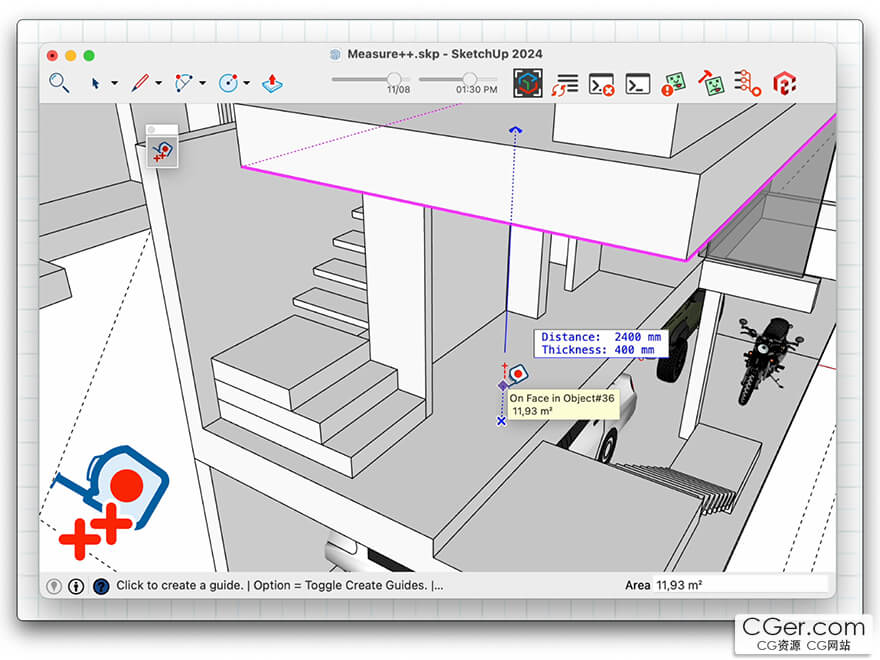
Curic measure++ uses the Overlay API (SketchUp 2023 and above) to display measurements directly as you hover.
Here are some things it can do
Show object dimensions (length, width, height) and recognize basic shapes like box, cylinder, or bar.
Act like a laser to check the clear space between objects.
Measure object thickness by casting a reverse ray - helpful for walls, panels, slabs.
Measure distance from objects to nearby faces, edges, guides, or axes.
Detect and measure openings (like doors or windows) on a face.
Pin measurements - keep information visible for a point (like coordinates) or a line (with visual dimension).
Hold Shift to check angles between edges or faces.
Detect and measure repeating objects (like arrays, stairs, copies…).
Easily check the center and radius of arcs and circles by simply hovering over them.
描述:
标签: su Sketchup 插件 软件 工具 测量分类:资源 > 软件资源 > 软件资源:未分类
发布:CGer | 查看: | 发表时间:2025/11/25 22:11:16 | 更新时间:2025/11/25 22:13:37
○ 充值或账号问题请【点击这里联系站长】 |


点击消耗 10 CG点(约 1.0 元)解锁 30个通用资源, 24小时内有效!(有效期内不重复扣点)



| 常见问题,点击查询: | ||
| ●CGer(Cg儿)资源下载帮助 | ||
| ●资源名词解释 | ||
| ●注册/登陆问题 | ||
| ●充值出错/修改密码/忘记密码 | ||
| ●充值赠送系统 | ||
| ●文件解压出错/解压密码 | ||
| ●Payment with Paypal | ||
| ●哪些资源会被列为付费资源 | ||
| ●为何要充值解锁 | ||
| ●免责条款 | ||
| ●联系站长(联系站长前请先仔细阅读 免责条款 ,网站只提供资源,不提供软件安装等服务!) | ||