Artstation - Military Tactical Vest Full Tutorial + 3D Model - 教程
本产品包含完整的建模、贴图、灯光和渲染教程,以及FBX和OBJ格式的军用战术背心3D模型。
超过 10 小时的完整教程(建模、UV 展开、贴图和渲染)
游戏就绪的基础模型
干净的四边形拓扑结构
采用 UDIM 工作流程展开 UV
4K PNG 格式贴图(16 位)
本教程包使用的软件:
Marvelous Designer / Blender / Rizom UV / ZBrush / 3ds Max / Substance Painter / Marmoset Toolbag
Blender 插件:Hardops
3ds Max 插件:UV Tools 3.2g
无解说
实时教程
教程包包含:
超过 7 小时的建模和拓扑重构教程,共 11 个部分(Marvelous Designer、Blender、3ds Max)
UV 展开教程,共 2 个部分(Rizom UV)
超过 2 小时的贴图教程,共 4 个部分(ZBrush、Substance Painter)
灯光和渲染教程,共 1 个部分(Marmoset Toolbag)
教程概述:
步骤 1. 在 Marvelous Designer 中创建基础模型。此步骤创建的模型细节较少。
步骤 2. 使用 Rizom UV 进行 UV 打包,并准备进行拓扑重构。
步骤 3. 在 ZBrush 和 3ds Max 中进行拓扑重构。
步骤 4. 在 Blender 中重新展开模型 UV 并添加细节,例如缝线、布料边缘、扣环和五金件、胶带等。
步骤 5. 在 ZBrush 中雕刻和细化细节。此步骤会生成两个输出文件:高模 OBJ(用于烘焙参考)和低模 FBX(用于贴图的基础模型)。
步骤 6. 继续进行贴图绘制,最后将模型导入 Marmoset Toolbag 进行灯光和渲染。
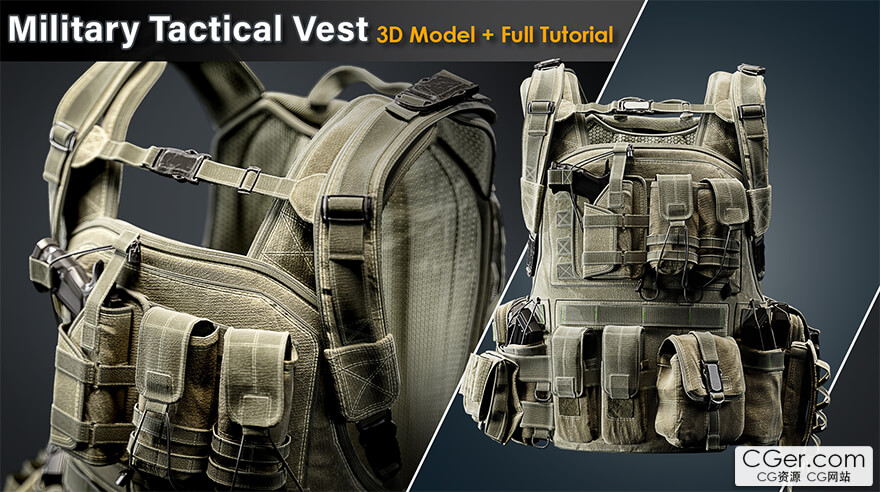
This product contains full modeling ,texturing, lighting and rendering tutorial and 3D model of Military Tactical Vest in FBX and OBJ.
+10 hrs Full Tutorial (Modeling, Unwrapping, Texturing and Rendering)
Game Ready Base Mesh
Clean Quad Topology
Unwrapped in UDIMs workflow
4K Textures in PNG (16 bit)
Softwares used in this pack:
Marvelous Designer/ Blender / Rizom UV / ZBrush / 3Ds Max / Substance Painter / Marmoset Toolbag
Addons Used in Blender:Hardops
Plugin used in 3Ds Max: UV Tools 3.2g
No narrated
Realtime tutorial
Tutorial pack contains:
+7 hrs Modeling and Retopo Tutorial in 11 Parts (Marvelous Designer, Blender, 3Ds Max)
Unwrapping Tutorial in 2 Parts (Rizom UV)
+2 hrs Texturing Tutorial in 4 Parts (ZBrush, Substance Painter)
Lighting and Rendering in 1 Part (Marmoset Toolbag)
Tutorial Overview:
Step 1. Creating base model in Marvelouse Designer. in this part the model is created with less details.
Step 2. packing UV in Rizom UV and preparing the mesh for retopo.
Step 3. Retopo process goes on in ZBrush and 3Ds Max.
Step 4. re-unwrapping of the model and adding details in Blender such as sewing lins, fabric edges, buckles and hardwares, tapes etc ...
Step 5. Sculping and refining detials in ZBrush. in this step we have two outputs; high poly OBJ as a baking refrence and low poly FBX as a base model for texturing.
Step 6. texturing goes on and in last session the model is imported in Marmoset Toolbag for lighting and rendering.
描述:
标签: 建模 材质 渲染 教程分类:教程 > 3D教程 > 3Ds max
发布:CGer | 查看: | 发表时间:2025/12/2 17:12:49 | 更新时间:2025/12/2 17:12:49
○ 充值或账号问题请【点击这里联系站长】 |


点击解锁当前付费资源,消耗 20 CG 点(约2.0 元), 24小时内有效(有效期内不重复扣点)
—————————————————————————————————————————————— | ||
| 哪些资源会被列为付费资源? ●站长付费购买的资源,站长从其他途径付费购买的资源。 ●资源包体积巨大,需要大量时间上传,占用大量存储空间的资源。(目前超过10GB的资源可能会列为付费资源) ●内容经常被某些人倒卖并恶意举报的资源,收费可以减少恶意举报的概率。 ●稀少的和高质量的资源。 |



| 常见问题,点击查询: | ||
| ●CGer(Cg儿)资源下载帮助 | ||
| ●资源名词解释 | ||
| ●注册/登陆问题 | ||
| ●充值出错/修改密码/忘记密码 | ||
| ●充值赠送系统 | ||
| ●文件解压出错/解压密码 | ||
| ●Payment with Paypal | ||
| ●哪些资源会被列为付费资源 | ||
| ●为何要充值解锁 | ||
| ●免责条款 | ||
| ●联系站长(联系站长前请先仔细阅读 免责条款 ,网站只提供资源,不提供软件安装等服务!) | ||