quick-groups-v1.0.3
此 Blender 插件用其自身功能替换了 Ctrl+G 的默认功能 - 使用常规实例创建组。在插件中,“组”是一个实例,可以通过按 Tab 键在名为“库”的场景中进行编辑。
快捷键:
Ctrl+G - 从选定的对象创建组(实例)(按 F9(调整上次操作)可设置组的中心点并命名)
Tab - 进入组编辑模式
取消选择所有对象并按 Tab 键 - 返回场景。
Ctrl+Alt+G - 解散组
Ctrl+Shift+G - 高级选项,例如创建独立用户副本和更改实例(例如将椅子替换为另一把椅子)。
此插件使用 Blender 的常规实例,因此即使您的同事没有安装此插件,您也可以发送包含使用此插件创建的“组”的 .blend 文件。
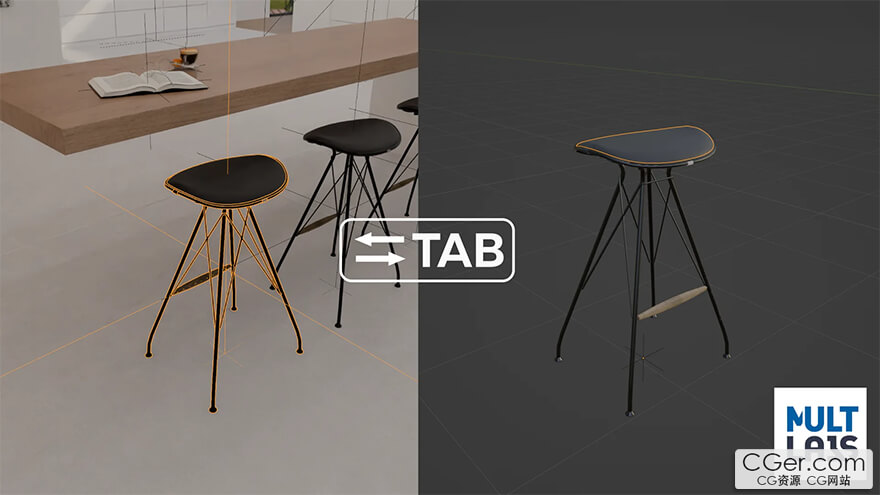
This add-on replaces Ctrl+G by its own functionality - creating groups using regular instances
In the add-on "Group" - it is an instance, that can be edited (in the scene called "Library") by pressing Tab
Keymap:
Ctrl+G - Make Group (Instance) from selected objects (F9 (adjust last operation) to set center of the group and set a name)
Tab - Opens group edit mode
Deselect everything and press Tab - Return to scene.
Ctrl+Alt+G - Ungroup
Ctrl+Shift+G - Advanced options like make single user, and change instance (Replace chair by another chair).
This add-on uses regular Blender instances, so you can send your blend file with "groups" made by this add-on, even if your co-worker haven't this add-on installed.
描述:
标签: blender 插件 软件 工具 成组 打组分类:资源 > 软件资源 > Blender及其插件
发布:CGer | 查看: | 发表时间:2025/12/23 20:55:05 | 更新时间:2025/12/23 20:58:17
○ 充值或账号问题请【点击这里联系站长】 |

| 网盘下载链接 | 链接: https://pan.baidu.com/s/10Vh4QtFxRcsncy0aoA5scQ?pwd=py1f 提取码: py1f |
| 常见问题,点击查询: | ||
| ●CGer(Cg儿)资源下载帮助 | ||
| ●资源名词解释 | ||
| ●注册/登陆问题 | ||
| ●充值出错/修改密码/忘记密码 | ||
| ●充值赠送系统 | ||
| ●文件解压出错/解压密码 | ||
| ●Payment with Paypal | ||
| ●哪些资源会被列为付费资源 | ||
| ●为何要充值解锁 | ||
| ●免责条款 | ||
| ●联系站长(联系站长前请先仔细阅读 免责条款 ,网站只提供资源,不提供软件安装等服务!) | ||





-

网站置顶/公示帖集合
29 0 0
资源 > 软件资源 > Blender及其插件
-

网站置顶/公示帖集合
19 0 0
资源 > 软件资源 > Blender及其插件
-

网站置顶/公示帖集合
1699 0 4
资源 > 软件资源 > Blender及其插件