MONONODES - SPLIT SCREEN MATTES DCTLS V1.0
对于剪辑师和调色师来说,创建专业的分割屏布局一直以来都是一项繁琐的工作,需要使用静态的 PNG 叠加层、复杂的 Fusion 合成或无法缩放的僵硬模板。MonoNodes Split Screen Mattes DCTL (v1.0) 通过引入专为 DaVinci Resolve Studio 设计的程序化、完全可控的布局引擎,彻底革新了这一工作流程。该工具集由 Stefan Ringelschwandtner 创建,使创作者能够直接在调色页面上构建动态的高端视觉合成,并达到前所未有的精度。
与传统素材不同,这些 DCTL(DaVinci 颜色变换语言)是数学生成的,并且是实时更新的。这意味着它们可以自动适应任何时间线分辨率或宽高比,确保您的布局始终清晰锐利、完美对齐,无论您是在 4K、8K 还是社交媒体的竖屏格式中工作。MonoNodes 无需外部图像文件,为视觉叙事提供了一个更简洁、更快速、更灵活的环境。
该软件包包含三个不同的 DCTL 版本——Organic、Steady 和 Structur——每个版本都针对不同的创意需求量身定制。“Structur”工具是一个强大的基于行的布局引擎,最多支持五行,每行包含可自定义数量的面板。这使得复杂的多镜头布局能够保持完美的平衡。用户可以通过简单的滑块直观地调整宽度偏移、间距(装订线)和边距大小等参数,从而完全掌控画面几何形状。
除了基本的定位功能外,MonoNodes 分屏遮罩还提供高级美学优化。您可以轻松调整遮罩边缘的柔化程度,或添加时尚的圆角,使您的项目看起来更加现代精致。无论您是想要简洁的“企业”网格、电影般的多视角序列,还是“有机”的实验性布局,这些工具都能提供足够的灵活性,让您无需离开调色页面即可实现您的创意构想。
这款专为 macOS、Windows 和 Linux 专业工作流程设计的 DCTL 套件兼容 DaVinci Resolve Studio 19.1 及更高版本。它不仅仅是一个遮罩,更是一套全面的布局系统,以强大而专业的工具取代了“懒惰”的静态解决方案。对于那些既追求效率又不愿牺牲创作控制的用户而言,MonoNodes 分屏遮罩是任何后期制作工具包中不可或缺的补充,它能将复杂的分屏操作转化为流畅的实时创作流程。
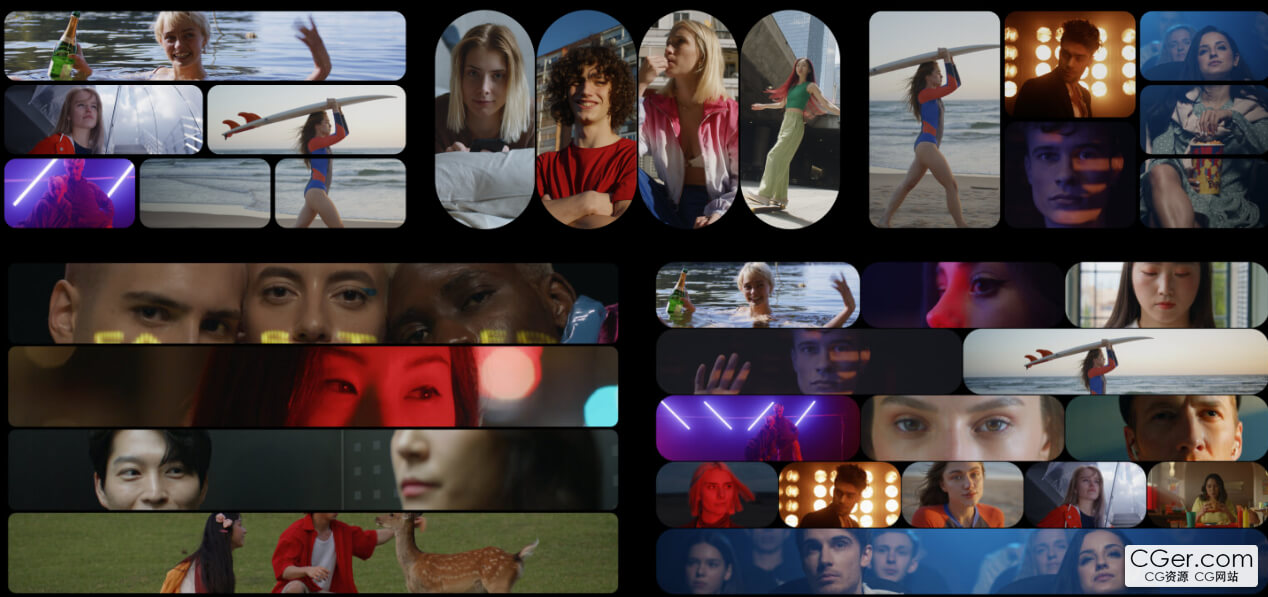
For editors and colorists, creating professional split-screen layouts has traditionally been a tedious process involving static PNG overlays, complex Fusion compositions, or rigid templates that refuse to scale. The MonoNodes Split Screen Mattes DCTL (v1.0) revolutionizes this workflow by introducing a procedural, fully controllable layout engine designed specifically for DaVinci Resolve Studio. Created by Stefan Ringelschwandtner, this toolset empowers creators to build dynamic, high-end visual compositions directly on the Color Page with unparalleled precision.
Unlike traditional assets, these DCTLs (DaVinci Color Transform Language) are mathematically generated and live. This means they automatically adapt to any timeline resolution or aspect ratio, ensuring your layouts remain crisp and perfectly aligned whether you are working in 4K, 8K, or vertical formats for social media. By eliminating the need for external image files, MonoNodes provides a cleaner, faster, and more flexible environment for visual storytelling.
The package includes three distinct DCTL versions—Organic, Steady, and Structur—each tailored to different creative needs. The "Structur" tool is a powerful row-based layout engine that supports up to five rows, with each row containing its own customizable number of panels. This allows for complex, multi-shot arrangements that remain perfectly balanced. Users can intuitively adjust parameters such as width bias, spacing (gutters), and margin size through simple sliders, giving you total control over the geometry of your frame.
Beyond basic positioning, the MonoNodes Split Screen Mattes offer advanced aesthetic refinements. You can easily adjust the softness of edges or add stylish rounded corners to your mattes, giving your project a modern, sophisticated look. Whether you are aiming for a clean "corporate" grid, a cinematic multi-perspective sequence, or an "organic" experimental layout, these tools provide the versatility to execute your vision without leaving the Color Page.
Designed for professional workflows on macOS, Windows, and Linux, this DCTL set is compatible with DaVinci Resolve Studio 19.1 and higher. It is more than just a matte—it is a comprehensive layout system that replaces "lazy" static solutions with a robust, professional-grade tool. For those who demand efficiency without sacrificing creative control, the MonoNodes Split Screen Mattes are an essential addition to any post-production toolkit, turning complex paneling into a streamlined, real-time creative process.
描述:
标签: 达芬奇 调色 后期 色彩 分级 预设分类:资源 > 2D资源 > 调色预设文件
发布:CGer | 查看: | 发表时间:2026/1/17 19:34:03 | 更新时间:2026/1/17 19:37:17
○ 充值或账号问题请【点击这里联系站长】 |


点击消耗 10 CG点(约 1.0 元)解锁 30个通用资源, 24小时内有效!(有效期内不重复扣点)



| 常见问题,点击查询: | ||
| ●CGer(Cg儿)资源下载帮助 | ||
| ●资源名词解释 | ||
| ●注册/登陆问题 | ||
| ●充值出错/修改密码/忘记密码 | ||
| ●充值赠送系统 | ||
| ●文件解压出错/解压密码 | ||
| ●Payment with Paypal | ||
| ●哪些资源会被列为付费资源 | ||
| ●为何要充值解锁 | ||
| ●免责条款 | ||
| ●联系站长(联系站长前请先仔细阅读 免责条款 ,网站只提供资源,不提供软件安装等服务!) | ||