Aescreens Pearelax v1.1.2
在After Effects 中轻松实现 2D 转 3D。
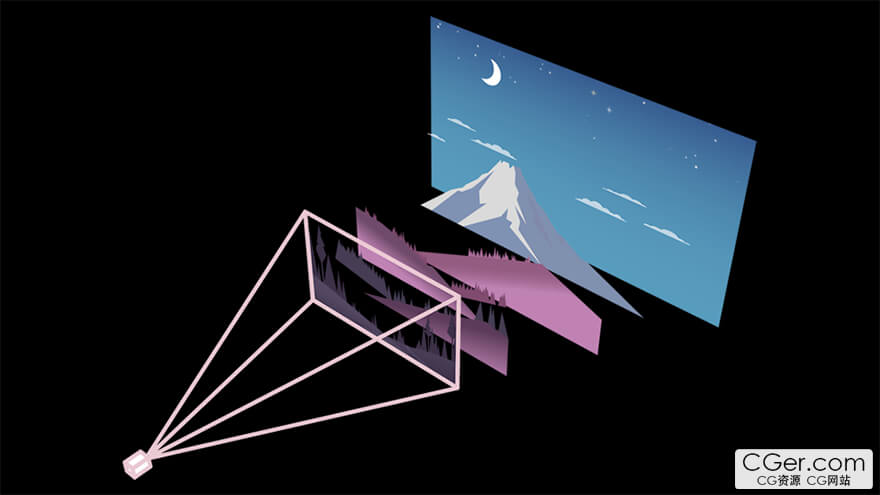
Pearelax 让您只需单击一下即可将任何分层 2D 合成转换为沉浸式 3D 场景。在 Z 轴空间中偏移图层,同时保持其光学尺寸,从而创建视差动画和 3D 摄像机运动。
自动视差
启用交错功能后,您可以均匀分配每个图层之间的 3D 空间。开始为摄像机添加动画,即可自动获得视差效果。
实时控制
启用控制功能后,您可以实时控制 3D 偏移。调整好图层后,您可以烘焙控制参数以加快渲染速度。
任意摄像机,任意角度。
启用摄像机锁定后,Pearelax 将根据当前活动摄像机的帧偏移图层。支持摄像机关键帧和实时控制。
让照片动起来
Pearelax 也非常适合处理摄影作品。它可以从 Photoshop 分层文件中精确创建 3D 场景,并将静态图像转化为神奇的图像。
2D to 3D. Easy.
Pearelax lets you transform any layered 2d comp into an immersive 3d scene with one click. Offset layers in z space while retaining their optical size to create parallax animations and 3d camera movement.
Automatic parallax
With staggering enabled, you can evenly distribute the 3d space between each layer. Start animating the camera and you’ll automatically have a parallax effect.
Automatic 3d parallax animation
Live controls
With controls enabled, you’ll be able to control the 3d offset in real time. Once you have your layers dialed in, you can bake the controls to speed up your render times.
Pearelax After Effects Script UI
Any camera. Every angle.
With camera lock enabled, Pearelax will offset layers based on the current framing of the active camera. Includes support for camera keyframes and live controls.
Separate layers in 3d space
Put photos in motion
Pearelax works great with photography too. Precisely create a 3d scene from a layered Photoshop file and turn a static image into a magic image.
描述:
标签: ae After Effects 插件 软件 工具分类:资源 > 软件资源 > After effects 插件
发布:CGer | 查看: | 发表时间:2026/3/2 22:51:44 | 更新时间:2026/3/2 22:54:26
○ 充值或账号问题请【点击这里联系站长】 |

| 网盘下载链接 | 链接: https://pan.baidu.com/s/1_jH0fq5KOR3Z2ZeSwPPyrg?pwd=qk49 提取码: qk49 |
| 常见问题,点击查询: | ||
| ●CGer(Cg儿)资源下载帮助 | ||
| ●资源名词解释 | ||
| ●注册/登陆问题 | ||
| ●充值出错/修改密码/忘记密码 | ||
| ●充值赠送系统 | ||
| ●文件解压出错/解压密码 | ||
| ●Payment with Paypal | ||
| ●哪些资源会被列为付费资源 | ||
| ●为何要充值解锁 | ||
| ●免责条款 | ||
| ●联系站长(联系站长前请先仔细阅读 免责条款 ,网站只提供资源,不提供软件安装等服务!) | ||





-

网站置顶/公示帖集合
173 0 0
资源 > 软件资源 > After effects 插件
-

网站置顶/公示帖集合
102 0 1
资源 > 软件资源 > After effects 插件
-
网站置顶/公示帖集合
98 0 0
资源 > 软件资源 > After effects 插件