Railcut v1.0.1.1
Railcut v1.1.0
Railcut v1.1.1
来吧,在 After Effects 中编辑。Railcut 将基于轨道的剪辑编辑功能带入 After Effects。无需再往返于 Premiere,即可完成修剪、波纹编辑、剪切和移动剪辑。以前所有人都说不要在 After Effects 里做剪辑,他们没说错。多年来,大家一直说同样的话:“After Effects 不是剪辑软件,去 Premiere 里剪。”从历史上看,这确实是真的。AE 预览慢,实时回放从未实现,任何改动都意味着重新渲染。往返于 Premiere 的剪辑工作流只是工作的一部分。
但情况已经改变了。凭借 After Effects 的性能改进和现代硬件,实时回放已真正成为可能。After Effects 可以成为你的剪辑工具。
它只是从未拥有过合适的工具,所以我亲手打造了它们。
After Effects 缺失的剪辑工具。
多轨时间轴
视频轨道在上,音频轨道在下,和其他所有 NLE(非编软件)一样,瞬间上手。
完整工具面板
选择、刀片、波纹编辑、滚动编辑、滑动、滑移、速率拉伸、轨道选择、钢笔、缩放、平移——所有你已经熟悉的工具。
音频波形
在每个剪辑上显示音频波形,让你绝不错过任何节拍。
视频缩略图
每个剪辑(包括视频和静态图像)都显示首帧预览,让你始终清楚自己在看什么。
键盘快捷键
内置 Premiere、DaVinci、Final Cut 和 After Effects 预设,完全可自定义。
从项目面板拖拽
从 AE 的项目面板或直接从访达(Finder)将素材拖放到时间轴上。
吸附功能
剪辑、播放头和标记点会自动吸附到编辑点,可通过 Shift+S 切换开关。
实时图层同步
在 AE 中选择一个图层,Railcut 中也会同步选中,始终与合成中的操作保持同步。
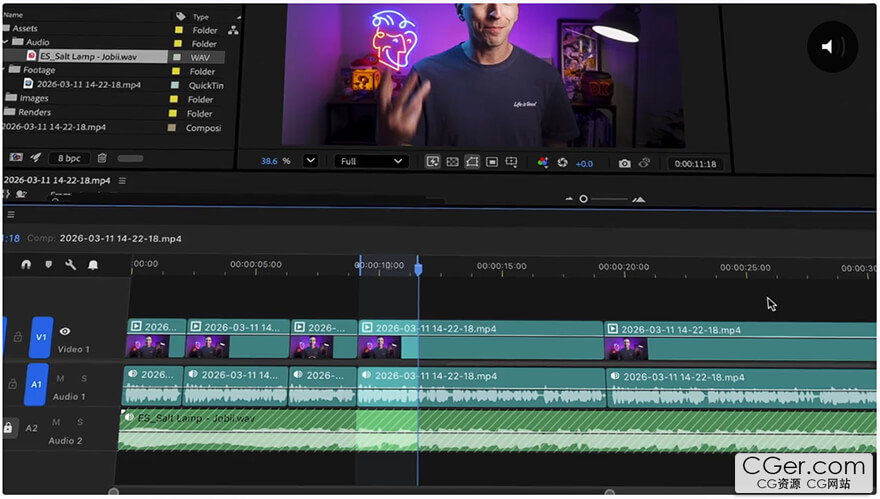
Go ahead. Edit in After Effects. Railcut brings track-based clip editing to After Effects. Trim, ripple, cut, and move clips without roundtripping to Premiere ever again. Everyone said don't edit in After Effects. They weren't wrong. For years, everyone said the same thing: "After Effects is not an editor. Go edit in Premiere." And historically, that was true. AE previews were slow. Realtime playback was never possible. Changing anything meant re-rendering. The editing roundtrip to and from Premiere was just part of the job.
But things have changed. Between After Effects' performance improvements and modern hardware, realtime playback is genuinely achievable. After Effects can be your editor.
It just never had the right tools, so I built them.
The editing tools After Effects was missing.
Multi-track timeline
Video tracks above, audio tracks below, just like every other NLE. Instantly familiar.
Full tool palette
Select, Blade, Ripple Edit, Rolling Edit, Slip, Slide, Rate Stretch, Track Select, Pen, Zoom, Pan; all the tools you already know.
Audio waveforms
See your audio on every clip so you never miss a beat.
Video thumbnails
First-frame previews on every clip, for video and still images, so you always know what you're looking at.
Keyboard shortcuts
Built-in presets for Premiere, DaVinci, Final Cut, and After Effects. Fully customizable.
Drag from Project Panel
Drop footage from AE's Project Panel or straight from Finder, directly onto the timeline.
Snapping
Clips, playhead, and markers snap to edit points. Toggle on/off with Shift+S.
Live layer sync
Select a layer in AE and it selects in Railcut. Always in step with what's happening in your comp.
描述:
标签: ae After Effects 插件 软件 工具分类:资源 > 软件资源 > After effects 插件
发布:CGer | 查看: | 发表时间:2026/4/22 10:32:37 | 更新时间:2026/7/5 21:56:48
○ 充值或账号问题请【点击这里联系站长】 |

Railcut v1.0.1.1 链接: https://pan.baidu.com/s/1RK4OVWWNMY8HM-n9xmPQSg?pwd=p2mz 提取码: p2mz Railcut v1.1.0 链接: https://pan.baidu.com/s/1GQGXq6yE5X963pAHyIxUYA?pwd=hdqd 提取码: hdqd Railcut v1.1.1 链接: https://pan.baidu.com/s/1IAXbiPD3KVfEVxesdGO09Q?pwd=rrj5 提取码: rrj5 | |
| 常见问题,点击查询: | ||
| ●CGer(Cg儿)资源下载帮助 | ||
| ●资源名词解释 | ||
| ●注册/登陆问题 | ||
| ●充值出错/修改密码/忘记密码 | ||
| ●充值赠送系统 | ||
| ●文件解压出错/解压密码 | ||
| ●Payment with Paypal | ||
| ●哪些资源会被列为付费资源 | ||
| ●为何要充值解锁 | ||
| ●免责条款 | ||
| ●联系站长(联系站长前请先仔细阅读 免责条款 ,网站只提供资源,不提供软件安装等服务!) | ||





-
网站置顶/公示帖集合
27 0 0
资源 > 软件资源 > After effects 插件
-
网站置顶/公示帖集合
21 0 0
资源 > 软件资源 > After effects 插件
-

网站置顶/公示帖集合
6 0 0
资源 > 软件资源 > After effects 插件