Gp Select v1.1.0
这是一款专注于剪纸风格、木偶动画的 Grease Pencil 工具,旨在加快您的绑定工作流程。即使您不是剪纸动画师或不使用 Grease Pencil 进行绑定,也依然可以从中受益。
此插件的核心理念是:您只需选中所需的描边,然后执行需要的操作即可。 使用编辑模式(或开启选择蒙版的雕刻模式)来选择描边。选中描边后,您可以执行以下操作:更改图层、隔离描边以便权重绘制、按选择重新排序图层、按选择遮罩、按选择隐藏图层、按选择重命名、按选择调整不透明度、多图层复制、删除选中的描边图层、按选择移动组、按选择将多个图层分组、按前缀/中缀/后缀及索引通道选择——所有这些都基于您选中的描边。“切换到图层”将是最常用的操作,可快速跳转到某个图层进行绘制,或执行其他 GpSelect 功能。
我还添加了骨骼生成工具,请在本页底部附近查看。
*注意:如果您对某个功能的运作方式不了解,按钮上设有可查看的工具提示,将鼠标悬停在按钮上即可阅读。另外,“Weight selected”(按选择权重)功能的原理是锁定描边的材质。而所有其他功能都基于已选中描边的前提工作。因此,如果您遇到任何意外行为,请牢记这一点。
此外,我还额外添加了模式切换工具,因为您最常用到的将是套索工具。包括笔刷、套索、拉扯、捏合、强度、厚度等。(“捏合”本应处于其“膨胀”模式,以模拟位图绘图软件中的液化工具,但由于存在一些问题,我将在后续版本中添加。)
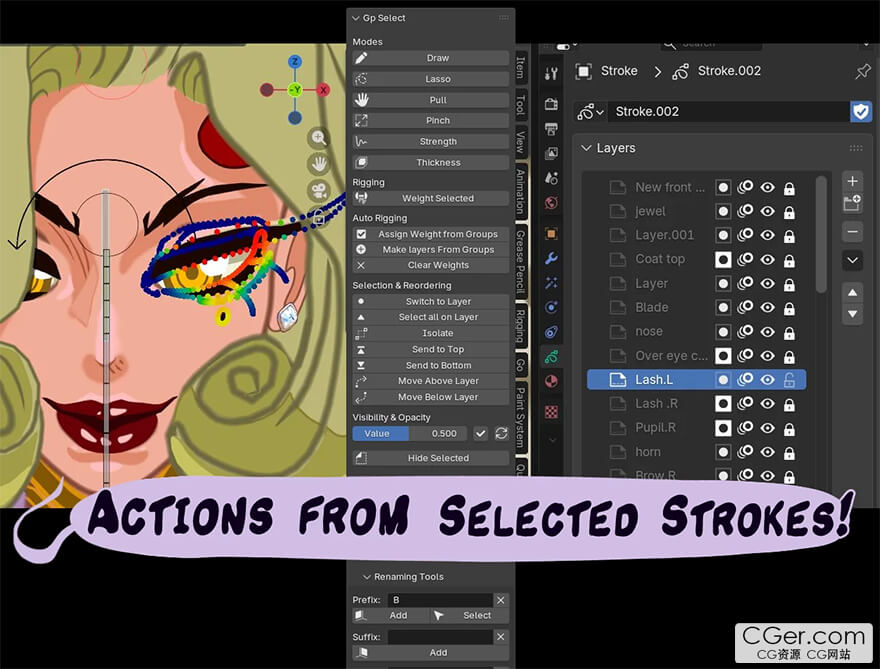
This is a Cut Out, puppet animation focused Grease Pencil tool to speed up your rigging workflow. Even if you aren't a cutout animator, or rig Grease Pencil, you'll still benefit.
The idea behind this add-on is: you just select the stroke you want, and perform the action you need. Use Edit mode (or Sculpt mode with selection masks turned on) to select strokes. Then while a stroke is selected you can: Change layers, Isolate strokes for weight painting, reorder layers by selection, Mask by selected, Hide layers by selected, Rename by selected, Opacity by selected, Multiple layer duplication, Delete selected stroke layers, Move groups by selected, Group multiple layers by selected, Select by prefix, infix, suffix, and index passes — all by the strokes you have selected. "Switch to Layer" will be the most useful operator. Quickly go to a layer to draw on it, or to perform the other GpSelect functions.
I also added rig generation tools. Check that out near the bottom here.
*Note: If you don't understand how something works, I have tooltips on the buttons you can read. You see them by hovering over the button. Also, the way "Weight selected" works is by locking the stroke's material. And everything else works by having a stroke selected. So just keep that in mind if you have any unexpected behavior.
Also, I added mode switching tools for that added benefit, because you are going to need the lasso tool most of all. Brush, lasso, pull, pinch, Strength, and Thickness. (Pinch was meant to be in its "Inflate" mode so it acts like the liquefy tool in raster art apps, but there were some issues with it, so I'll add it later.)
描述:
标签: blender 插件 软件 工具分类:资源 > 软件资源 > Blender及其插件
发布:CGer | 查看: | 发表时间:2026/4/26 21:55:49 | 更新时间:2026/4/26 21:59:11
○ 充值或账号问题请【点击这里联系站长】 |

| 网盘下载链接 | 链接: https://pan.baidu.com/s/17QfSnuD0xrksW-PFDoZWwA?pwd=v87j 提取码: v87j |
| 常见问题,点击查询: | ||
| ●CGer(Cg儿)资源下载帮助 | ||
| ●资源名词解释 | ||
| ●注册/登陆问题 | ||
| ●充值出错/修改密码/忘记密码 | ||
| ●充值赠送系统 | ||
| ●文件解压出错/解压密码 | ||
| ●Payment with Paypal | ||
| ●哪些资源会被列为付费资源 | ||
| ●为何要充值解锁 | ||
| ●免责条款 | ||
| ●联系站长(联系站长前请先仔细阅读 免责条款 ,网站只提供资源,不提供软件安装等服务!) | ||





-

网站置顶/公示帖集合
12 0 0
资源 > 软件资源 > Blender及其插件
-

网站置顶/公示帖集合
30 0 0
资源 > 软件资源 > Blender及其插件
-

网站置顶/公示帖集合
51 0 0
资源 > 软件资源 > Blender及其插件