Gradient Flow v1.0
Gradient Flow 让您可以在 After Effects 中的形状图层和纯色图层之间即时复制和粘贴渐变。 凭借智能粘贴模式、多图层支持以及简洁的界面,它加快了工作流程并保持设计的视觉一致性。
在 After Effects 中即时复制和粘贴渐变
不再浪费时间手动重新创建渐变。Gradient Flow 是一款强大的 After Effects 扩展,让您可以在图层之间即时复制和粘贴渐变——无论是处理形状图层还是纯色图层。它将重复性任务转变为快速的一键式工作流程。
非常适合希望保持项目视觉一致性,同时节省宝贵制作时间的动态设计师、动画师和 UI 艺术家。
功能特性
即时复制和粘贴渐变
适用于形状图层和纯色图层
同时粘贴到多个选定的图层
支持填充、描边或两者同时
保持布局模式以维持渐变结构
智能且响应迅速的工作流程
简洁、极简且直观的界面
专为快速动态设计工作流程而设计
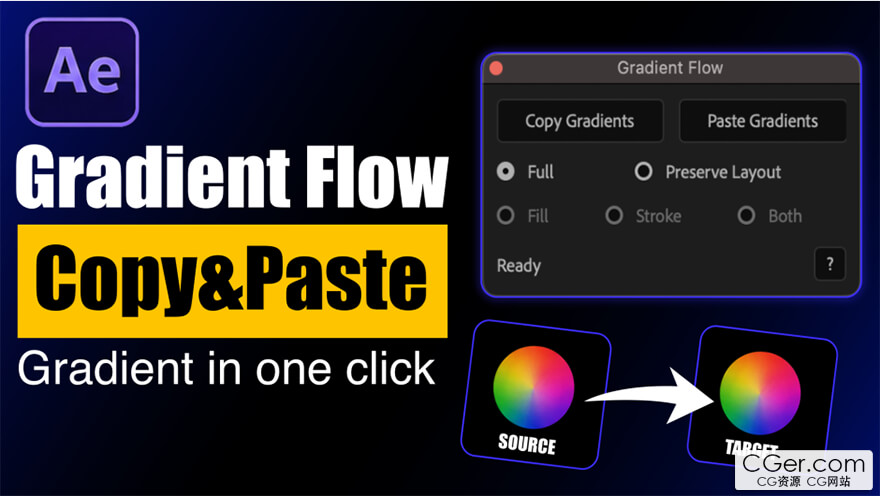
Gradient Flow lets you instantly copy and paste gradients between shape and solid layers in After Effects. With smart paste modes, multi‑layer support, and a clean interface, it speeds up workflow and keeps your designs visually consistent.
Copy & Paste Gradients Instantly in After Effects
Stop wasting time recreating gradients manually. Gradient Flow is a powerful After Effects extension that lets you copy and paste gradients across layers instantly — whether you're working with shape layers or solid layers. It transforms a repetitive task into a fast, one‑click workflow.
Perfect for motion designers, animators, and UI artists who want to keep their projects visually consistent while saving valuable production time.
Features
Instantly copy and paste gradients
Works with shape layers and solid layers
Paste to multiple selected layers at once
Supports Fill, Stroke, or Both
Preserve Layout Mode to maintain the gradient structure
Smart and responsive workflow
Clean, minimal, and intuitive UI
Designed for fast motion design workflows
描述:
标签: ae After Effects 插件 软件 工具分类:资源 > 软件资源 > After effects 插件
发布:CGer | 查看: | 发表时间:2026/6/4 21:12:50 | 更新时间:2026/6/4 21:15:55
○ 充值或账号问题请【点击这里联系站长】 |

| Gradient Flow v1.0 链接: https://pan.baidu.com/s/1RKl3VSopbGkJ8y3R2vASEg?pwd=ncba 提取码: ncba | |
| 常见问题,点击查询: | ||
| ●CGer(Cg儿)资源下载帮助 | ||
| ●资源名词解释 | ||
| ●注册/登陆问题 | ||
| ●充值出错/修改密码/忘记密码 | ||
| ●充值赠送系统 | ||
| ●文件解压出错/解压密码 | ||
| ●Payment with Paypal | ||
| ●哪些资源会被列为付费资源 | ||
| ●为何要充值解锁 | ||
| ●免责条款 | ||
| ●联系站长(联系站长前请先仔细阅读 免责条款 ,网站只提供资源,不提供软件安装等服务!) | ||





-

网站置顶/公示帖集合
27 0 0
资源 > 软件资源 > After effects 插件
-
网站置顶/公示帖集合
21 0 0
资源 > 软件资源 > After effects 插件
-

网站置顶/公示帖集合
5 0 0
资源 > 软件资源 > After effects 插件