MoTi V1.0.0
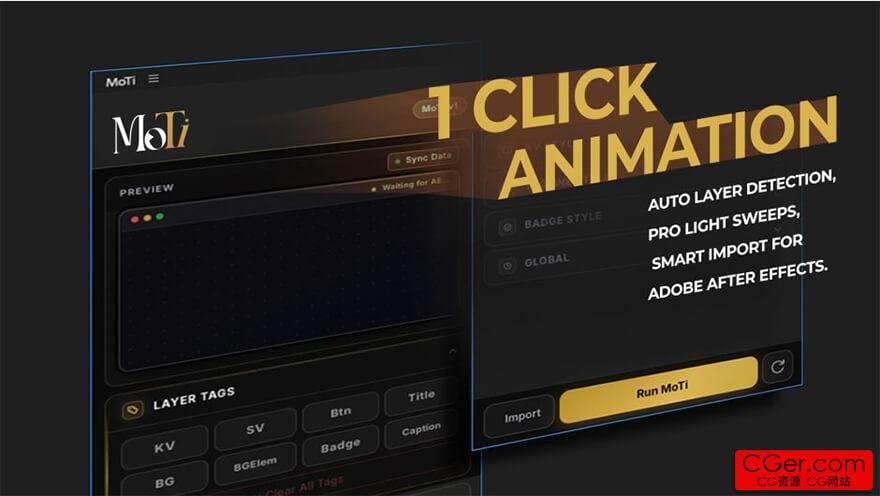
MoTi - After Effects 一键动画自动化。标记一次。MoTi 为所有内容添加动画。 MoTi 将分层的宣传素材,通过一次“Run MoTi”点击,转变为完成的 After Effects 动态图形。
导入您的设计,标记重要图层,选择动态风格,MoTi 便会直接在您当前活动的合成中构建入场动画、强调动画、辅助动态以及可选的退场动画。
它专为制作产品广告、促销图形、标题卡、活动帖子、社交媒体宣传以及需要快速完成精美动态效果的重复性客户修改而打造。
跳过关键帧的繁琐工作
大多数宣传动画都反复使用相同的结构:一个主视觉、一个标题、一个徽章、说明文字、背景元素和一个行动号召。
MoTi 将这种重复的设置转变为更快的工作流程,同时将最终结果作为可编辑的图层和关键帧保留在 After Effects 内部。
您无需手动构建每一个入场动作、徽章弹出、光线扫过和退场动画,而是分配简单的图层角色,让 MoTi 为您生成动画。
MoTi 的工作原理
导入分层的素材 - 使用智能导入功能导入 PSD 或 Illustrator 文件,或者从现有的 After Effects 合成开始。
标记您的图层 - 分配角色,如 KV(主视觉)、SV(副视觉)、标题、徽章、说明文字、BG(背景)、BGElem(背景元素)或 Btn(按钮)。
选择动态风格 - 选择主视觉、标题、徽章和全局时间选项。
运行 MoTi - 点击“Run MoTi”,扩展程序将直接在活动合成中生成动画。
审阅并导出 - 浏览时间轴,按需调整任何内容,然后像往常一样通过 After Effects 或 Adobe Media Encoder 渲染输出。
MoTi - One-Click Animation Automation for After Effects
Tag once. MoTi animates everything. MoTi turns layered promo artwork into finished After Effects motion graphics with one “Run MoTi” click.
Import your design, tag the important layers, choose a motion style, and MoTi builds the entrance, emphasis, helper motion, and optional outro timing directly in your active composition.
It is made for creators who build product ads, sale graphics, title cards, event posts, social media promos, and repeated client revisions where polished motion needs to happen fast.
Skip the keyframe busywork
Most promo animations use the same structure again and again: a key visual, a title, a badge, captions, background elements, and a call to action.
MoTi turns that repeated setup into a faster workflow while keeping the final result inside After Effects as editable layers and keyframes.
Instead of manually building every entrance move, badge pop, light sweep, and outro, you assign simple layer roles and let MoTi generate the motion for you.
How MoTi works
Import layered artwork – Use Smart Import for PSD or Illustrator files, or start from an existing After Effects composition.
Tag your layers – Assign roles such as KV, SV, Title, Badge, Caption, BG, BGElem, or Btn.
Choose motion styles – Pick key visual, title, badge, and global timing options.
Run MoTi – Click “Run MoTi” and the extension generates animation directly in the active composition.
Review and export – Scrub the timeline, adjust anything you want, then render normally from After Effects or Adobe Media Encoder.
描述:
标签: ae After Effects 插件 软件 工具分类:资源 > 软件资源 > After effects 插件
发布:CGer | 查看: | 发表时间:2026/6/5 11:43:51 | 更新时间:2026/6/5 11:43:51
○ 充值或账号问题请【点击这里联系站长】 |

MoTi V1.0.0 链接: https://pan.baidu.com/s/1Jm4Y6JFVRcPUCqCG5W6tSg?pwd=3cha 提取码: 3cha | |
| 常见问题,点击查询: | ||
| ●CGer(Cg儿)资源下载帮助 | ||
| ●资源名词解释 | ||
| ●注册/登陆问题 | ||
| ●充值出错/修改密码/忘记密码 | ||
| ●充值赠送系统 | ||
| ●文件解压出错/解压密码 | ||
| ●Payment with Paypal | ||
| ●哪些资源会被列为付费资源 | ||
| ●为何要充值解锁 | ||
| ●免责条款 | ||
| ●联系站长(联系站长前请先仔细阅读 免责条款 ,网站只提供资源,不提供软件安装等服务!) | ||





-

网站置顶/公示帖集合
105 0 0
资源 > 软件资源 > After effects 插件
-
网站置顶/公示帖集合
187 0 15
资源 > 软件资源 > After effects 插件
-

网站置顶/公示帖集合
13 0 0
资源 > 软件资源 > After effects 插件