Ambiera WebsitePainter 3.9 Win
WebsitePainter 是一款无需 HTML 知识和编程即可创建专业外观网站的网页编辑器。只需点击几下,即可创建包含 Web2.0 按钮、渐变、圆角边框、悬停效果、透明效果、连续文本等元素的网页。
功能特性
只需点击几下即可创建现代网站
在 WebsitePainter 中,通过几次简单的点击,Web 2.0 按钮、透明形状、渐变等元素尽在指尖。您不再需要无休止地绘制图像、编辑 CSS 样式和 HTML 元素。
像素级完美布局的精确放置
WebsitePainter 允许您通过简单的点击和移动,将网站的所有元素精确地放置在您想要的位置。不再需要复杂的布局规则,WebsitePainter 会为您处理这些,并按照您期望的外观生成 HTML 站点。这听起来可能很简单,但令人遗憾的是,在当前 HTML 标准复杂的布局系统下,这对网站设计师来说已成为一项棘手的任务,而 WebsitePainter 消除了这一负担。
只需点击几下即可创建幻灯片、菜单和图片库
WebsitePainter 内置了对动态 HTML 内容的支持。例如,您可以使用一系列图片创建一个动态幻灯片,图片以可调的速度淡入淡出。您还可以创建一些按钮或链接,使幻灯片更具交互性,例如手动切换到上一张或下一张图片。菜单和图片库也是如此。一切无需编程,只需点击几下即可。
支持绝对布局和动态尺寸布局
与其他网站编辑器不同,WebsitePainter 不仅支持网站的绝对布局,还能创建动态尺寸的元素:想要一个跨越整个屏幕左侧的侧边栏?需要一个底部菜单区域?或者两个?对于 WebsitePainter 来说都不是问题。只需使用编辑器的“布局容器”即可。
创建 HTML、PHP 和 ASP 页面
WebsitePainter 不限于创建 HTML 页面,您也可以使用它来创建 PHP、ASP 和其他页面。只需设置页面的扩展名,WebsitePainter 就会为您完成其余工作。使用 HTML 代码元素,您甚至可以在 WebsitePainter 中直接编辑您的 PHP、ASP 或其他代码。
完全控制生成的 HTML 代码
如果您需要对 WebsitePainter 生成的 HTML 代码进行更多控制,也可以自行编辑。只需右键单击任何元素并选择“HTML 代码…”菜单。在这里,您可以查看该元素生成的 HTML 代码,或者如果需要,甚至可以插入您自己的 HTML 属性、JavaScript 处理程序等。
通过 Unicode 支持所有语言
WebsitePainter 支持 Unicode,这意味着可以创建任何语言的网站,无论是英语、德语、韩语、中文、俄语、日语,还是您喜欢的任何语言。
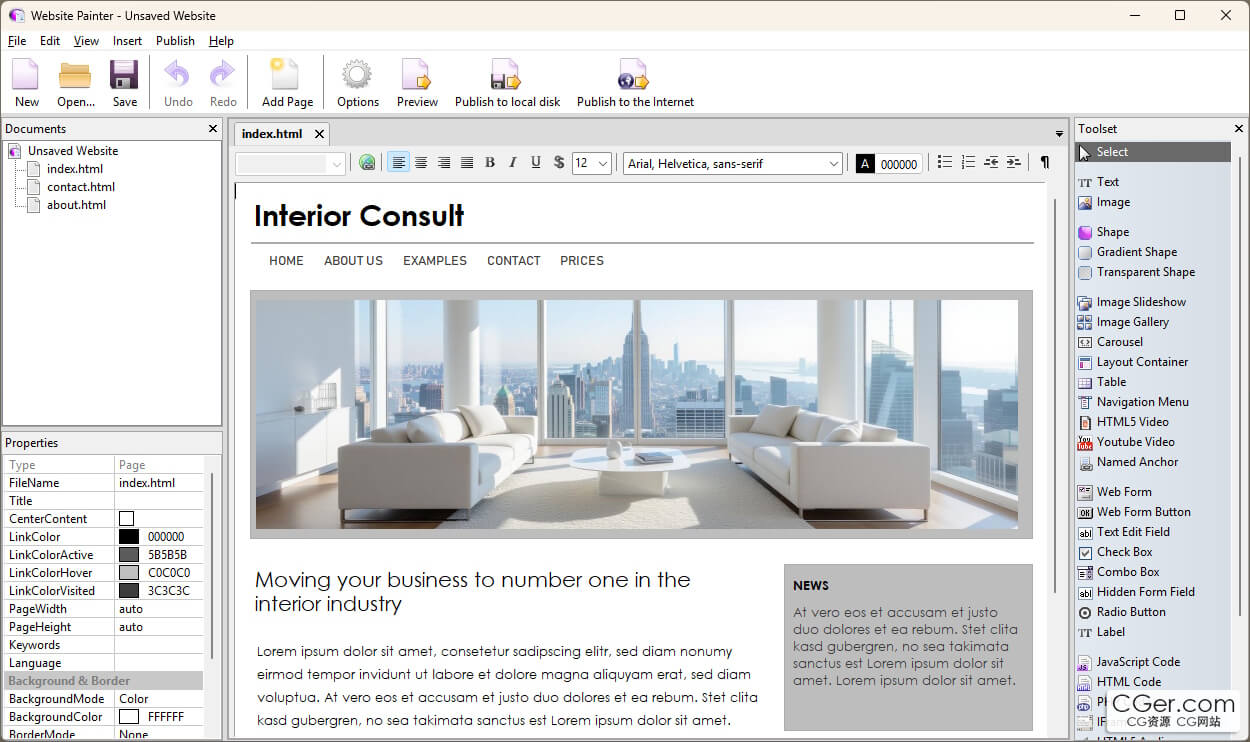
WebsitePainter is a web editor for creating professional‑looking websites without HTML knowledge or programming. With a few clicks, it is possible to create web pages with elements like Web 2.0 buttons, gradients, round borders, hover effects, transparencies, continuous text, and more.
Features
Modern Websites with a Few Clicks
Web 2.0 buttons, transparent shapes, and gradients are at your fingertips with a few simple clicks in WebsitePainter. You can create all the shapes you need for modern websites. No more endless drawing of images, editing of CSS styles, and HTML elements.
Exact Placement for Pixel‑Perfect Layouts
WebsitePainter allows you to place all elements of your website exactly where you want them to be, by simply clicking and moving them. No complex layout rules are needed anymore — WebsitePainter takes care of this and generates the HTML site exactly as you want it to look. This may sound trivial, but the sad reality is that with the complex layout system of today’s HTML standard, this has become a tricky task for website designers. WebsitePainter removes this burden.
Create Slideshows, Menus, and Image Galleries with Just a Few Clicks
WebsitePainter has built‑in support for dynamic HTML content. For example, you can create a dynamic slideshow with a list of images that fade in and out at an adjustable speed. You can also create buttons or links to make the slideshow more interactive, allowing you to manually switch to the next or previous image. The same applies to menus and image galleries. Everything without programming, just with a few clicks.
Supports Absolute as well as Dynamically Sized Layouts
Unlike other website editors, WebsitePainter not only supports absolute layout but is also capable of creating dynamically sized elements. Need a sidebar spanning the entire left side of the screen? Need a bottom menu area? Or two? Not a problem with WebsitePainter. Just use the editor’s “Layout Containers” for this.
Create HTML, PHP, and ASP Pages
WebsitePainter is not limited to creating HTML pages; you can also use it to create PHP, ASP, and other pages. Simply set the file extension for a page, and WebsitePainter will do the rest. With the HTML Code element, you can even directly edit your PHP, ASP, or any other code right inside WebsitePainter.
Full Control over the Generated HTML Code
If you need more control over the HTML code generated by WebsitePainter, you can edit it yourself. Simply right‑click any element and select the “HTML Code…” menu. Here you can view the generated HTML code for that element or even insert your own HTML attributes, JavaScript handlers, and more, if you wish.
Supports All Languages Through Unicode
WebsitePainter supports Unicode, meaning it is possible to create websites in any language — be it English, German, Korean, Chinese, Russian, Japanese, or whatever you like.
描述:
标签: 网页 制作 软件 工具分类:资源 > 软件资源 > 软件资源:未分类
发布:CGer | 查看: | 发表时间:2026/6/8 14:20:15 | 更新时间:2026/6/8 14:23:40
○ 充值或账号问题请【点击这里联系站长】 |


点击消耗 10 CG点(约 1.0 元)解锁 30个通用资源, 24小时内有效!(有效期内不重复扣点)



| 常见问题,点击查询: | ||
| ●CGer(Cg儿)资源下载帮助 | ||
| ●资源名词解释 | ||
| ●注册/登陆问题 | ||
| ●充值出错/修改密码/忘记密码 | ||
| ●充值赠送系统 | ||
| ●文件解压出错/解压密码 | ||
| ●Payment with Paypal | ||
| ●哪些资源会被列为付费资源 | ||
| ●为何要充值解锁 | ||
| ●免责条款 | ||
| ●联系站长(联系站长前请先仔细阅读 免责条款 ,网站只提供资源,不提供软件安装等服务!) | ||