ViewCompanion Premium 17.03.0.1203 Win
ViewCompanion Premium 是 ViewCompanion 系列中最强大的成员。 ViewCompanion Premium 可以查看、打印和转换 Adobe PDF、PDF/A、Autodesk DWF、PLT、CGM、TIFF、CALS、EDMICS 以及其他多种文件格式。使用 ViewCompanion Premium,您可以将文件转换为多种不同的输出格式,请查看下方支持的输出格式完整列表。
您的 PLT、CGM、Gerber 和 DWF 文件可以转换为 Autodesk DXF 格式,该格式可被所有流行的 CAD 应用程序(例如 Autodesk AutoCAD™)读取。
借助内置的 PDF 转 CAD 工具,您甚至可以将 PDF 文件转换为可编辑的 DXF、Gerber、CGM 或 SVG 文件。
软件包含批量转换和批量打印功能。软件可配置为监视用户定义的文件夹,复制到该文件夹的所有文件将根据您的设置自动打印。
您可以将多个不同格式的文件合并为一个多页 PDF、DWF 或 TIFF 文件。
ViewCompanion 可以将多页 PDF、TIFF 或 DWF 文件拆分为多个文件。您可以根据每个文件的最大页数或每个输出文件的最大文件大小来拆分 PDF 文件。
使用 ViewCompanion,您可以测量尺寸长度和面积。所有测量均可使用吸附到图形几何体的功能,以获得最高精度。测量工具可进行校准,以确保即使您的图纸不是 1:1 缩放,也能获得正确结果。测量结果可以导出为 Excel 工作簿(XLSX)或 CSV 文件,后者可由任何电子表格应用程序打开。
使用 ViewCompanion 比较不同修订版本的文件并可视化差异。您可以比较所有支持的文件格式,包括 PDF。多页 PDF 文件可以逐页比较。
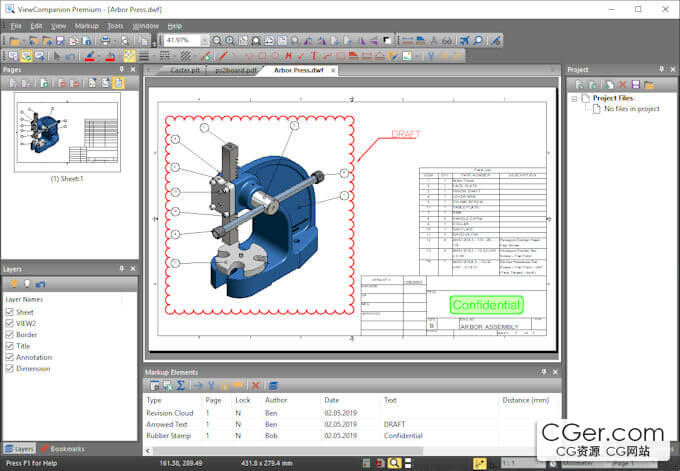
使用标记元素(如文本、高亮、尺寸线、面积测量、图章、手绘、箭头、条形码、符号、图像等)为您的文件添加注释。
ViewCompanion 支持符号库,方便您将常用符号作为标记添加。您可以从任何图像文件创建自己的符号库。安装后您还会找到一些可用的库。
所有标记元素将存储在一个单独的文件中,原始文件保持不变。在打印或转换所查看的文件时,可以选择包含这些标记元素。
ViewCompanion Premium is the most powerful member of the ViewCompanion family. ViewCompanion Premium can view, print, and convert Adobe PDF, PDF/A, Autodesk DWF, PLT, CGM, TIFF, CALS, EDMICS, and several other file formats. With ViewCompanion Premium, you can convert your files to many different output formats — please check the complete list of supported output formats below.
Your PLT, CGM, Gerber, and DWF files can be converted into Autodesk DXF format, which can be read by all popular CAD applications, for example Autodesk AutoCAD™.
With the built‑in PDF‑to‑CAD tools, you can even convert your PDF files into editable DXF, Gerber, CGM, or SVG files.
Both batch conversion and batch printing are included. The software can be configured to monitor a user‑defined folder, and all files copied to that folder will be automatically printed using your settings.
You can merge multiple files of different formats into a single multi‑page PDF, DWF, or TIFF file.
ViewCompanion can split a multi‑page PDF, TIFF, or DWF file into multiple files. You may split a PDF file either based on a maximum number of pages per file or based on the maximum file size for each output file.
With ViewCompanion, you can measure dimension lengths and areas. All measurements can be done using snap‑to‑drawing geometry for the highest accuracy. Calibration of the measurement tools is available to ensure correct results even if your drawings are not scaled 1:1. The measurement results may be exported to either an Excel Workbook (XLSX) or a CSV file, which can be opened by any spreadsheet application.
Use ViewCompanion to compare files of different revisions and visualize the differences. You can compare all supported file formats, including PDF. A multi‑page PDF file can be compared page by page.
Annotate your files using markup elements like text, highlight, dimension line, area measurement, stamp, freehand, arrow, barcode, symbol, image, and more.
ViewCompanion supports symbol libraries that make it easy to add frequently used symbols as markups. You can create your own symbol libraries from any image file. You will also find a few libraries available for you to use after installation.
All markup elements will be stored in a separate file, and the original file will be left unmodified. The markup elements can be included when the viewed file is printed or converted.
描述:
标签: 软件 查看 转换 格式分类:资源 > 软件资源 > 软件资源:未分类
发布:CGer | 查看: | 发表时间:2026/7/6 22:00:58 | 更新时间:2026/7/6 22:09:14
○ 充值或账号问题请【点击这里联系站长】 |


点击消耗 10 CG点(约 1.0 元)解锁 30个通用资源, 24小时内有效!(有效期内不重复扣点)



| 常见问题,点击查询: | ||
| ●CGer(Cg儿)资源下载帮助 | ||
| ●资源名词解释 | ||
| ●注册/登陆问题 | ||
| ●充值出错/修改密码/忘记密码 | ||
| ●充值赠送系统 | ||
| ●文件解压出错/解压密码 | ||
| ●Payment with Paypal | ||
| ●哪些资源会被列为付费资源 | ||
| ●为何要充值解锁 | ||
| ●免责条款 | ||
| ●联系站长(联系站长前请先仔细阅读 免责条款 ,网站只提供资源,不提供软件安装等服务!) | ||