Remove Tool AI for Adobe Photoshop v27.7 Win
我们很高兴地宣布,移除工具(Remove Tool)的端侧生成式 AI 模型现已进入 Beta 测试阶段!
您现在可以将生成式 AI 模型下载到您的个人设备上,离线工作并在本地进行处理——非常适合网络连接不稳定或不首选云端处理的情况。(这意义重大!)
使用方法:
选择移除工具。
在选项栏中,打开“模式”下拉菜单(自动 / 生成式 AI 开启 / 生成式 AI 关闭)。
在“生成式 AI 处理”部分,选择“设备”。
如果“设备”选项呈灰色不可用,则您的系统不满足运行该模型的最低要求。
根据提示,点击“下载”以开始下载(约 5 GB)。
下载完成后,将自动使用端侧模型。
您随时可以通过“模式”下拉菜单在云端处理和端侧处理之间切换。
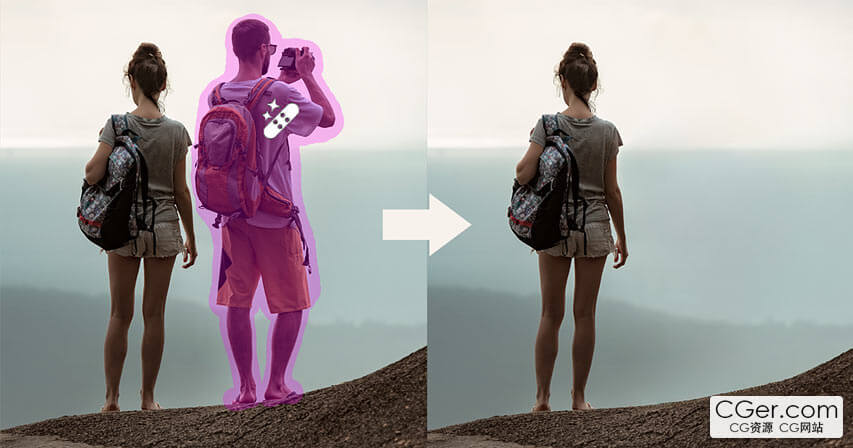
We are excited to announce the beta launch of an on‑device generative AI model for the Remove Tool!
You can now download the Generative AI model onto your personal device and work offline and process locally — ideal when internet connections are unreliable or when cloud processing isn’t preferred. (It's kind of a big deal!)
How to:
Select the Remove Tool.
In the Options bar, open the Mode drop‑down (Auto / GenAI On / GenAI Off).
In the Generative AI Processing section, choose Device.
If the Device option is dimmed and unavailable, your system does not meet the minimum requirements to run the model.
When prompted, click Download to start the download (approximately 5 GB).
Once the download completes, the on‑device model will be used automatically.
Switch between Cloud and Device processing at any time from the Mode drop‑down.
描述:
标签: ps photoshop 插件 工具 软件 ai分类:资源 > 软件资源 > Photoshop 插件
发布:CGer | 查看: | 发表时间:2026/7/11 19:35:51 | 更新时间:2026/7/11 19:40:34
○ 充值或账号问题请【点击这里联系站长】 |


点击消耗 10 CG点(约 1.0 元)解锁 30个通用资源, 24小时内有效!(有效期内不重复扣点)



| 常见问题,点击查询: | ||
| ●CGer(Cg儿)资源下载帮助 | ||
| ●资源名词解释 | ||
| ●注册/登陆问题 | ||
| ●充值出错/修改密码/忘记密码 | ||
| ●充值赠送系统 | ||
| ●文件解压出错/解压密码 | ||
| ●Payment with Paypal | ||
| ●哪些资源会被列为付费资源 | ||
| ●为何要充值解锁 | ||
| ●免责条款 | ||
| ●联系站长(联系站长前请先仔细阅读 免责条款 ,网站只提供资源,不提供软件安装等服务!) | ||






-

网站置顶/公示帖集合
192 0 2
资源 > 软件资源 > Photoshop 插件
-

网站置顶/公示帖集合
280 0 3
资源 > 软件资源 > Photoshop 插件
-
网站置顶/公示帖集合
2883 1 7
资源 > 软件资源 > Photoshop 插件