StyleForge 1.2.3 Blender ADDON
StyleForge 3dsMax 2027.1 v1.0.0
StyleForge Maya 2027.1 v1.0.11
StyleForge v1.2.3
StyleForge v1.2.8.Blender 5.2 Live Palette
StyleForge 是一款一体化的风格化世界创建工具包,旨在加速环境创建、绘制、散布、材质和资产工作流程。
现已支持:
Blender 5.2+
Autodesk Maya 2027 / 2027.1
Autodesk 3ds Max 2027 / 2027.1
完整功能列表
散布绘制
在 3D 视口中直接点击拖拽散布物体
基于顶点的散布绘制
绘制草、岩石、树木、花卉和蘑菇
一个绘制的顶点可生成一个可见物体
在表面上拖拽以创建连续的散布轨迹
按住 Ctrl 键同时绘制可擦除散布的物体
可调节的笔刷半径
可调节的笔刷强度
可调节的笔刷衰减
绘制时自动刷新几何节点
自动创建散布遮罩
遮罩和散布层状态指示器
自动准备默认 Blender 平面
可配置的平面网格细分
适用于平面、地形和其他网格表面
重建和更新现有散布层
为不同资产类型单独设置散布层
程序化散布
在网格表面上进行随机程序化散布
可调节的散布密度
可调节的随机种子
最小和最大物体缩放
随机物体旋转
多种物体变体
可选的实现化几何体
基于高度的放置控制
最小和最大散布高度
平面表面放置
陡坡表面放置
可调节的坡度限制
水位规避
可调节的岸线间距
基于噪波的斑块分布
可调节的斑块缩放
可调节的斑块细节
可调节的斑块阈值
绘制散布模式可绕过地形滤镜进行直接放置
程序化资产生成器
程序化不规则岩石生成器
随机化岩石形状
多种岩石变体
程序化叶片草生成器
草丛生成
树木生成器
随机化树木变体
自然环境资产创建
生成的资产可用于散布系统
智能轮廓系统
自动轮廓方法选择
支持平面网格的轮廓
支持开放网格的轮廓
支持闭合 3D 物体的轮廓
边缘轮廓模式
剪影轮廓模式
平面的边界轮廓
锐利边缘轮廓
可调节的锐利边缘角度
为闭合物体扩展的反向外壳轮廓
可调节的轮廓宽度
自定义轮廓颜色
创建或更新轮廓
从选定对象移除轮廓
移除所有 StyleForge 轮廓
轮廓集合管理
自动清理未使用的轮廓对象和数据
平面安全轮廓,不会在物体上方创建重复表面
面部调色板和颜色绘制
在单个网格面上绘制颜色
从可复用调色板中选择颜色
填充网格面
添加自定义调色板颜色
使用十六进制代码输入颜色
从支持的 StyleForge 主题导入颜色
从程序化材质导入颜色
替换或追加调色板颜色
重复颜色过滤
在 Blender 内部进行调色板管理
图像转调色板工具
从图像生成调色板
主色提取
唯一色提取
可调节的最大颜色数量
可调节的图像采样限制
可调节的颜色分离度
可选的透明像素过滤
可调节的 Alpha 阈值
支持的图像格式包括:
PNG
JPG 和 JPEG
BMP
TGA
TIFF
WebP
EXR
HDR
十六进制调色板文件
将调色板导出为可读的 TXT 文件
从 TXT 文件导入十六进制颜色调色板
使用标准文本编辑器编辑调色板
将导入的颜色追加到当前调色板
用导入的颜色替换当前调色板
重复颜色预防
程序化和主题材质
生成程序化 Blender 材质
直接将材质应用于选定对象
可自定义的材质颜色
主题材质预设
风格化材质选项
将材质颜色导入面部调色板
可复用的生成材质
可从 StyleForge 面板访问的材质控制
主题和世界预设
内置世界主题预设
自然主题
沙漠主题
雪地主题
奇幻主题
风格化游戏主题
1980 年代风格色彩主题
街机风格色彩主题
应用协调的环境颜色
将主题颜色导入面部调色板
快速改变场景的整体外观
UV 和网格工具
智能 UV 展开
对选定对象应用 UV 操作
为生成和绘制的材质进行 UV 准备
支持网格面绘制
为散布绘制准备平面
为可绘制顶点网格自动细分网格
图像平面工具
创建图像参考平面
将图像加载到 Blender 平面上
在环境和资产创建过程中使用参考图像
图像支持集成到 StyleForge 工作流程中
工作流程和界面
Blender 3D 视口中专用的 StyleForge 选项卡
组织有序的功能面板
对初学者友好的控制
清晰的编号散布工作流程
遮罩和层的状态消息
自动选择合适的轮廓方法
更新现有生成的效果,无需手动删除
干净的移除工具
旨在减少手动几何节点设置的需求
兼容 Blender 5.2
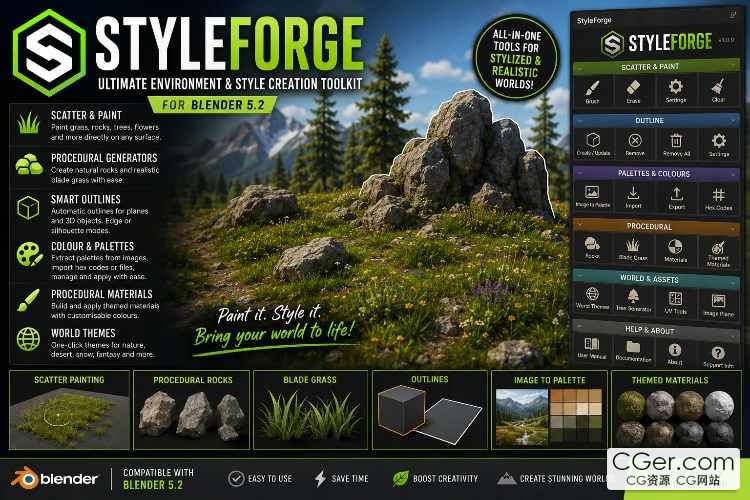
StyleForge is an all‑in‑one Blender environment and stylisation toolkit for creating procedural assets, painting object scatter, generating materials, managing colour palettes, producing outlines, and rapidly building stylised worlds.
Complete Feature List
Scatter Painting
Click‑and‑drag object scattering directly in the 3D Viewport
Vertex‑based scatter painting
Paint grass, rocks, trees, flowers, and mushrooms
One painted vertex can generate one visible object
Drag across a surface to create continuous scatter trails
Hold Ctrl while painting to erase scattered objects
Adjustable brush radius
Adjustable brush strength
Adjustable brush falloff
Automatic Geometry Nodes refresh while painting
Automatic creation of scatter masks
Mask and scatter‑layer status indicators
Automatic preparation of default Blender planes
Configurable plane grid subdivision
Works on planes, terrain, and other mesh surfaces
Rebuild and update existing scatter layers
Separate scatter layers for different asset types
Procedural Scattering
Random procedural scattering across mesh surfaces
Adjustable scatter density
Adjustable random seed
Minimum and maximum object scale
Random object rotation
Multiple object variants
Optional realized geometry
Height‑based placement controls
Minimum and maximum scatter height
Flat‑surface placement
Steep‑surface placement
Adjustable slope limit
Water‑level avoidance
Adjustable shoreline clearance
Noise‑based patch distribution
Adjustable patch scale
Adjustable patch detail
Adjustable patch threshold
Painted scatter mode can bypass terrain filters for direct placement
Procedural Asset Generators
Procedural irregular rock generator
Randomised rock shapes
Multiple rock variations
Procedural blade‑grass generator
Grass clump generation
Tree generator
Randomised tree variations
Natural environment asset creation
Generated assets can be used by the scatter system
Smart Outline System
Automatic outline method selection
Outline support for flat meshes
Outline support for open meshes
Outline support for closed 3D objects
Edge‑outline mode
Silhouette‑outline mode
Boundary outlines for planes
Sharp‑edge outlines
Adjustable sharp‑edge angle
Expanded inverted‑hull outlines for closed objects
Adjustable outline width
Custom outline colour
Create or update outlines
Remove outlines from selected objects
Remove every StyleForge outline
Outline collection management
Automatic cleanup of unused outline objects and data
Plane‑safe outlines that do not create a duplicate surface above the object
Face Palette and Colour Painting
Paint colours onto individual mesh faces
Select colours from a reusable palette
Flood‑fill mesh faces
Add custom palette colours
Enter colours using hexadecimal codes
Import colours from supported StyleForge themes
Import colours from procedural materials
Replace or append palette colours
Duplicate‑colour filtering
Palette management inside Blender
Image‑to‑Palette Tools
Generate colour palettes from images
Dominant‑colour extraction
Unique‑colour extraction
Adjustable maximum number of colours
Adjustable image sampling limit
Adjustable colour separation
Optional transparent‑pixel filtering
Adjustable alpha threshold
Supported image formats include:
PNG
JPG and JPEG
BMP
TGA
TIFF
WebP
EXR
HDR
Hexadecimal Palette Files
Export palettes as readable TXT files
Import hexadecimal colour palettes from TXT files
Edit palettes using a standard text editor
Append imported colours to the current palette
Replace the current palette with imported colours
Duplicate‑colour prevention
Procedural and Themed Materials
Generate procedural Blender materials
Apply materials directly to selected objects
Customisable material colours
Themed material presets
Stylised material options
Import material colours into the Face Palette
Reusable generated materials
Material controls available from the StyleForge panel
Themes and World Presets
Built‑in world‑theme presets
Nature‑inspired themes
Desert themes
Snow themes
Fantasy themes
Stylised game‑inspired themes
1980s‑style colour themes
Arcade‑style colour themes
Apply coordinated environment colours
Import theme colours into the Face Palette
Quickly change the overall appearance of a scene
UV and Mesh Tools
Smart UV unwrap
Apply UV operations to selected objects
UV preparation for generated and painted materials
Mesh‑face painting support
Plane preparation for scatter painting
Automatic mesh subdivision for paintable vertex grids
Image Plane Tools
Create image‑reference planes
Load images onto Blender planes
Use reference images during environment and asset creation
Image support integrated into the StyleForge workflow
Workflow and Interface
Dedicated StyleForge tab in the Blender 3D Viewport
Organised feature panels
Beginner‑friendly controls
Clear numbered scatter workflow
Status messages for masks and layers
Automatic selection of suitable outline methods
Update existing generated effects without manually deleting them
Clean removal tools
Designed to reduce the need for manual Geometry Nodes setup
Compatible with Blender 5.2
描述:
标签: blender 插件 软件 工具分类:资源 > 软件资源 > Blender及其插件
发布:CGer | 查看: | 发表时间:2026/8/17 11:12:46 | 更新时间:2026/8/25 22:20:43
○ 充值或账号问题请【点击这里联系站长】 |

StyleForge 1.2.3 Blender ADDON 链接: https://pan.baidu.com/s/1TgL9-XmT-zv774owhrSDPQ?pwd=x6j4 提取码: x6j4 StyleForge 3dsMax 2027.1 v1.0.0 链接: https://pan.baidu.com/s/1odAnbPn1zZaPGP9llMD4ag?pwd=3bip 提取码: 3bip StyleForge Maya 2027.1 v1.0.11 链接: https://pan.baidu.com/s/1DACsql8J0YrRU67t3se2yQ?pwd=upjd 提取码: upjd StyleForge v1.2.3 链接: https://pan.baidu.com/s/1wv9hrSoKquzfChrt6yLvQw?pwd=wqhi 提取码: wqhi StyleForge v1.2.8.Blender 5.2 Live Palette 链接: https://pan.baidu.com/s/1sNqftZzXGrXECzS2X-qrSA?pwd=tkkd 提取码: tkkd | |
| 常见问题,点击查询: | ||
| ●CGer(Cg儿)资源下载帮助 | ||
| ●资源名词解释 | ||
| ●注册/登陆问题 | ||
| ●充值出错/修改密码/忘记密码 | ||
| ●充值赠送系统 | ||
| ●文件解压出错/解压密码 | ||
| ●Payment with Paypal | ||
| ●哪些资源会被列为付费资源 | ||
| ●为何要充值解锁 | ||
| ●免责条款 | ||
| ●联系站长(联系站长前请先仔细阅读 免责条款 ,网站只提供资源,不提供软件安装等服务!) | ||



-
网站置顶/公示帖集合
4 0 0
资源 > 软件资源 > Blender及其插件
-
网站置顶/公示帖集合
117 0 2
资源 > 软件资源 > Blender及其插件
-

网站置顶/公示帖集合
677 0 4
资源 > 软件资源 > Blender及其插件