ONYX AI Matte v3.3.0 Win x64
专业 AI 遮罩提取插件(OFX 格式)
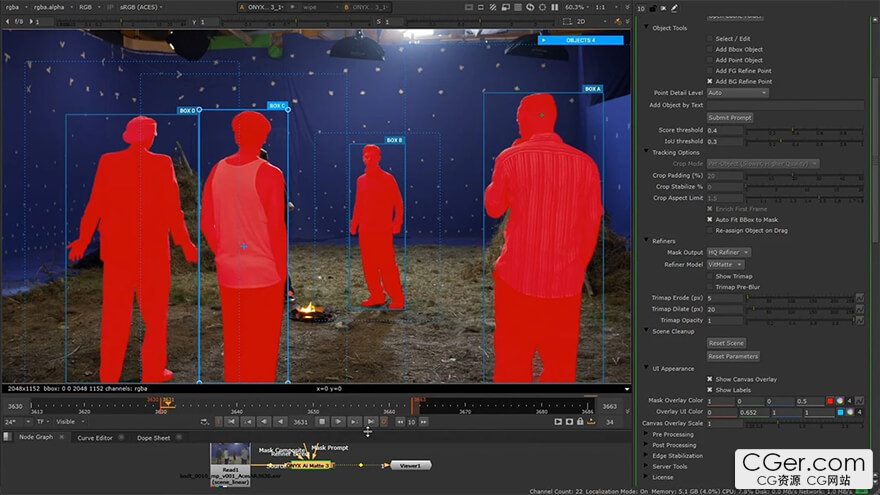
ONYX Ai Matte 是一款硬件加速的遮罩插件,适用于 DaVinci Resolve、Fusion Studio、Nuke、Flame 和 Natron - 支持 Windows、Linux 和 macOS。它专为需要制作级质量遮罩而又无需数小时手动转描工作的 VFX 艺术家而设计。由 Meta SAM3 结合 VitMatte 和 MEMatte 优化器驱动,它运行在一个统一的流程中:文本、点、框和蒙版提示在同一场景中协同工作,对象会自动跨帧跟踪。
主要功能
统一流程 — 在同一场景中结合使用框、点、文本和蒙版提示,最多支持 16 个对象
文本提示 — 输入任何对象类别(或几个,用逗号分隔)以自动检测所有实例
点选 — 点击以分割特定对象;正/负点用于细化
边界框 — 绘制框以进行快速矩形选择
蒙版提示输入 — 跟踪您已有的蒙版:一帧的转描即可成为完全跟踪的遮罩(也适用于子对象——如袖子、车门);在跟踪过程中移动蒙版,会在该帧自动设置一个校正关键帧
对象跟踪 — 遮罩自动跨帧传播;四种跟踪模式适用于任何镜头
对象管理器 — 画布上的面板,用于独奏、为可见性设置关键帧、细化和删除对象
三分图 + 高质量优化器 — 从遮罩自动生成三分图;VitMatte/MEMatte 优化边缘
优化器直接输入 — 将任何遮罩(您的转描,或在 Mocha 或其他系统中跟踪的蒙版)直接连接到优化器,以获得电影级质量的 Alpha 边缘
双优化器 — VitMatte(默认)和 MEMatte,可即时切换——为您的素材选择最佳方案
TensorRT 加速 — 在 NVIDIA RTX GPU 上,优化器推理速度提升 3-4 倍
时间平滑与边缘稳定 — 减少跨帧闪烁,实现干净的运动
边缘控制 — 羽化、收缩/扩展、偏移、色阶、二值阈值,用于精细调整
叠加预览 — 带有可自定义颜色的实时遮罩预览
烘焙到磁盘 — 将遮罩缓存到磁盘;重新打开项目后,无需引擎和显存即可播放
完美适用于
多角色场景:找到所有人物,独奏特定演员
复杂的毛发和毛皮提取,具有电影级边缘质量
通过文本优先发现实现快速商业项目周转
在 Nuke、DaVinci Resolve、Fusion Studio、Flame 和 Natron 中进行 4K+ 合成
通过优化器直接工作流程细化外部遮罩(转描、平面跟踪)
Professional AI Matte Extraction Plugin for OFX
ONYX Ai Matte is a hardware‑accelerated matting plugin for DaVinci Resolve, Fusion Studio, Nuke, Flame, and Natron — on Windows, Linux, and macOS — built for VFX artists who need production‑quality mattes without hours of manual roto work. Powered by Meta SAM3 with the VitMatte and MEMatte refiners, it runs one unified pipeline: text, point, box, and mask prompts work together in a single scene, and objects track across frames automatically.
Key Features
Unified Pipeline — Box, Point, Text, and Mask prompts in one scene, supporting up to 16 objects
Text Prompts — Type any object class (or several, comma‑separated) to detect all instances automatically
Point Selection — Click to segment a specific object; positive/negative points for refinement
Bounding Box — Draw a box for quick rectangular selection
Mask Prompt Input — Track a mask you already have: a one‑frame roto becomes a fully tracked matte (works for sub‑objects too — a sleeve, a car door); move the mask mid‑track and a correction key is set right on that frame
Object Tracking — Masks propagate across frames automatically; four tracking modes for any shot
Object Manager — On‑canvas panel to solo, keyframe visibility, refine, and delete objects
Trimap + HQ Refiner — Automatic trimap from the masks; VitMatte/MEMatte refine the edges
Refiner Direct Input — Connect any matte (your roto, or a mask tracked in Mocha or another system) straight to the refiner for cinema‑quality alpha edges
Dual Refiners — VitMatte (default) and MEMatte, switchable instantly — pick the best for your footage
TensorRT Acceleration — 3‑4× faster refiner inference on NVIDIA RTX GPUs
Temporal Smoothing & Edge Stabilization — Reduce flickering across frames for clean motion
Edge Controls — Feather, shrink/grow, offset, levels, binary threshold for fine‑tuning
Overlay Preview — Real‑time mask preview with customizable colors
Bake to Disk — Cache masks to disk; reopen the project and play back with no engine and no VRAM
Perfect For
Multi‑character scenes: find all people, solo specific actors
Complex hair and fur extraction with cinema‑quality edges
Fast commercial turnaround with text‑first discovery
4K+ compositing in Nuke, DaVinci Resolve, Fusion Studio, Flame, and Natron
Edge‑refining external mattes (roto, planar‑tracked) via the Refiner Direct workflow
描述:
标签: 插件 软件 工具 蒙版 ai分类:资源 > 软件资源 > 软件资源:未分类
发布:CGer | 查看: | 发表时间:2026/8/25 21:14:33 | 更新时间:2026/8/25 21:18:34
○ 充值或账号问题请【点击这里联系站长】 |


点击消耗 10 CG点(约 1.0 元)解锁 30个通用资源, 24小时内有效!(有效期内不重复扣点)



| 常见问题,点击查询: | ||
| ●CGer(Cg儿)资源下载帮助 | ||
| ●资源名词解释 | ||
| ●注册/登陆问题 | ||
| ●充值出错/修改密码/忘记密码 | ||
| ●充值赠送系统 | ||
| ●文件解压出错/解压密码 | ||
| ●Payment with Paypal | ||
| ●哪些资源会被列为付费资源 | ||
| ●为何要充值解锁 | ||
| ●免责条款 | ||
| ●联系站长(联系站长前请先仔细阅读 免责条款 ,网站只提供资源,不提供软件安装等服务!) | ||