PTE Video Optimiser v1.0.3.1 Win x64
一款强大的视频增强工具。轻松增强和优化你的视频。 稳定、降噪、修剪、色彩校正等。享受编辑的即时实时预览,以及对多个文件的无缝批量处理。
视频稳定
我们先进的稳定技术会分析每一帧,校正运动,将不稳定的素材转变为平滑、电影级品质的片段。可在两种稳定模式之间选择:Standard(标准),用于一般用途,以及 Camera Lock(相机锁定),通过保持画面稳定和聚焦来模拟类似三脚架的稳定性。它非常适合视频博主、内容创作者,或任何希望视频看起来精致专业的人。
降噪
我们的降噪功能通过有效去除像素噪点同时保持图像清晰度,增强在低光条件下拍摄的视频。以最小的努力获得干净、专业品质的视觉效果,同时不牺牲细节。只需切换一个选项即可启用降噪——快速、简单且极其有效。
色彩校正与 USM 锐化
使用多功能的色彩校正工具增强你的视频,调整亮度、对比度、色阶和饱和度以获得完美的外观。如需额外效果,可启用 Unsharp Mask(USM 锐化) 来锐化细节,或应用高斯模糊获得更平滑的完成度——所有这些都简单直观易用。
视频编辑工具
修剪视频
裁剪视频画面
反向播放
镜像视频
调整视频速度。用于慢动作的帧插值
为视频添加水印(标志)
静音音频或调整音频音量
导出与优化
使用 H.264 编解码器(MP4)或 AV1 编解码器创建视频
将多个视频合并为一个文件
智能视频压缩,以恒定质量实现最佳文件大小
用于视频编码的 GPU 加速
仅将视频文件中的音轨导出为 MP3 或 WAV 文件
系统要求: Windows 10 和 Windows 11
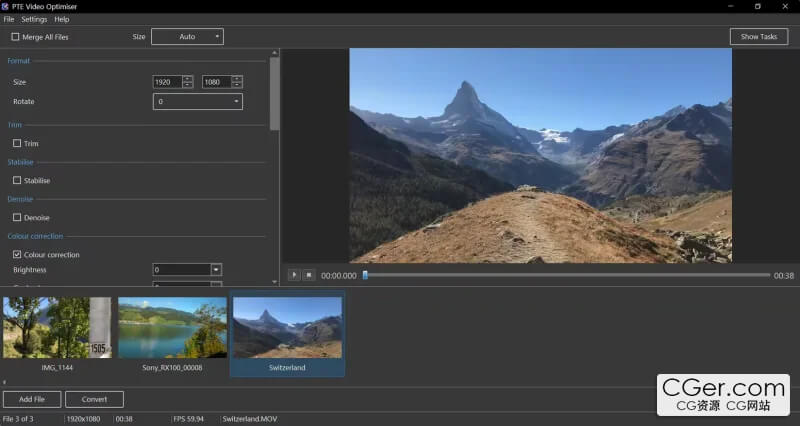
A Powerful Video Enhancement Tool. Easily enhance and optimise your videos. Stabilisation, noise reduction, trimming, colour correction, and more. Enjoy instant real‑time previews of your edits and seamless batch processing for multiple files.
Video Stabilisation
Our advanced stabilisation technology analyses every frame, correcting movement and transforming unsteady footage into smooth, cinematic‑quality clips. Choose between two stabilisation modes: Standard, for general use, and Camera Lock, which simulates tripod‑like stability by keeping the frame steady and focused. It's perfect for vloggers, content creators, or anyone who wants their videos to look polished and professional.
Noise Reduction
Our noise reduction feature enhances videos shot in low‑light conditions by effectively removing pixel noise while preserving image clarity. Achieve clean, professional‑quality visuals without compromising on detail, all with minimal effort. Simply toggle a single option to enable noise reduction — quick, easy, and incredibly effective.
Colour Correction and Unsharp Mask
Enhance your videos with versatile colour correction tools, adjusting brightness, contrast, levels, and saturation to achieve the perfect look. For added effects, enable Unsharp Mask to sharpen details or apply Gaussian Blur for a smoother finish — all simple and intuitive to use.
Video Editing Tools
Trim video
Crop video frame
Reverse playback
Mirror video
Adjust video speed. Frame interpolation for slow‑motion
Add a watermark (logo) to your video
Mute audio or adjust the audio volume
Export & Optimisation
Create video with H.264 codec (MP4) or AV1 codec
Merge multiple videos into one file
Smart video compression with a constant quality with optimal file size
GPU acceleration for video encoding
Export only the audio track from a video file as MP3 or WAV file
System Requirements: Windows 10 and Windows 11
描述:
标签: 软件 工具 视频 编辑 后期分类:资源 > 软件资源 > 软件资源:未分类
发布:CGer | 查看: | 发表时间:2026/11/19 21:29:04 | 更新时间:2026/11/19 21:32:43
○ 充值或账号问题请【点击这里联系站长】 |


点击消耗 10 CG点 (约 1.0 元)可解锁 30个通用资源,24小时内有效!(有效期内不重复扣点)
| 常见问题,点击查询: | ||
| ●CGer(Cg儿)资源下载帮助 | ||
| ●资源名词解释 | ||
| ●注册/登陆问题 | ||
| ●充值出错/修改密码/忘记密码 | ||
| ●充值赠送系统 | ||
| ●文件解压出错/解压密码 | ||
| ●Payment with Paypal | ||
| ●哪些资源会被列为付费资源 | ||
| ●为何要充值解锁 | ||
| ●免责条款 | ||
| ●联系站长(联系站长前请先仔细阅读 免责条款 ,网站只提供资源,不提供软件安装等服务!) | ||