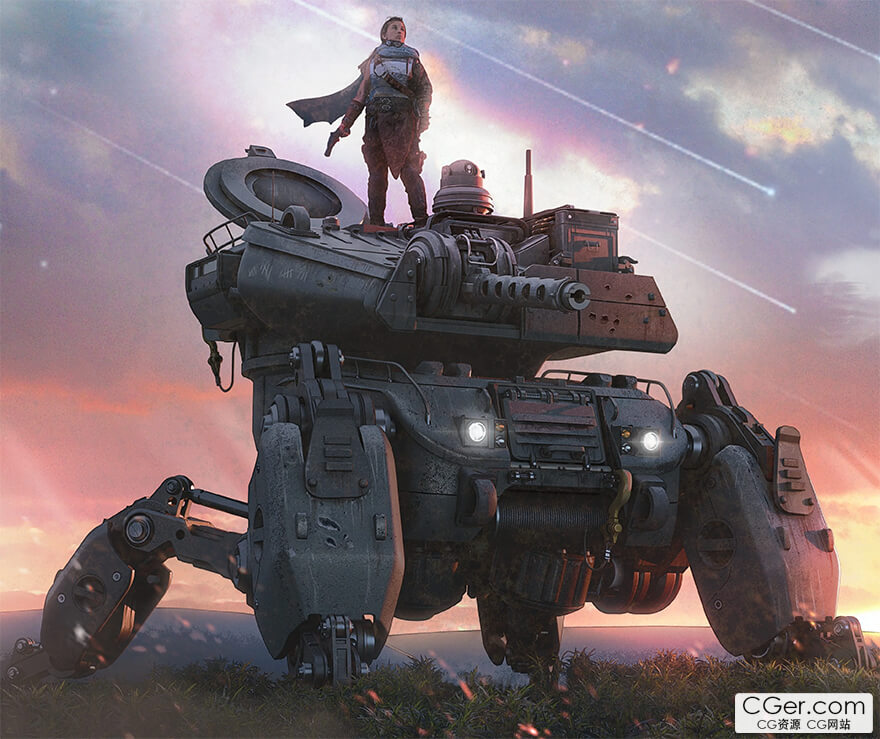
CG Characters - How to Design Realistic Mechs in Blender by Jeremy Hunter
如何在Blender中设计逼真的机甲教程(作者:Jeremy Hunter),22GB。
17+ 小时的内容
其他地方找不到的动手练习
以设计为先的工作流程,教授的是艺术而不仅仅是建模
循序渐进的课程计划,消除学习压力
拥有教育学学位的讲师(让你真正学到东西)
全程语音指导,步骤清晰
最终获得一个可用于作品集的项目
1. 奠定基础: 我们将深入探讨我的个人教学理念,并建立一些学习目标。最后,我将带你了解我自己的 Blender 设置,并分享一些技巧,为你后续的课程打下良好基础。
2. 自我设限: 我们将引入一项至关重要的自我挑战练习。就像穿着负重背心训练一样,掌握本节内容将使你在后续课程中更自信、更高效地工作。
3. 扩展工具包: 是时候摘下手套了。在这里,我们将介绍我们全套的建模工具。我们将采用实用的方法来创建可信的 3D 组件,这对于让我们的机甲栩栩如生至关重要。
4. 设计理念: 这是开始整合的阶段——即粗模搭建阶段。我们将通过现实世界的参考来理解形态如何有逻辑地分层、连接和有意义地构建。我们将演示一些易于遵循的策略,以便每次都成功完成这一关键的设计步骤。
5. 细化构想: 在这里,我们将解决每个机甲设计的核心难题。设计成败在此一举。从粗模到细化的过渡是一种微妙的推拉关系——一种岌岌可危的舞蹈,但凭借第 1-4 课学到的技能,我们将使其变得几乎毫不费力。我们不急于陷入细节,而是练习克制。我们逐步构建复杂性——分阶段细化整个模型,使每个决策都服务于整体设计。
6. 材质与着色器: 在本节中,你将学习一种快速、灵活的材质和纹理处理方法——注重清晰度和视觉冲击力,而非复杂性。我们将涵盖一个精简的绘制工作流程,用于添加磨损、损坏和变化,以及增强形态和可读性的简单着色器技术。
7. 制作关键帧: 出色的设计需要出色的展示。在最后一节中,你将学习如何像概念艺术家而不是纯粹的建模师那样展示你的作品。我们将创建电影级的关键帧,展示你的机甲在行动中的状态。我们将使用灯光、构图和环境来讲述故事。我将分享我的渲染设置和后期处理工作流程,包括我在 Photoshop 中用于将图像提升到专业水平所采用的技术。
17+ hours of content
Hands‑on exercises you won't find anywhere else
Design‑first workflows that teach ART, not just modeling
Scaffolded lesson plan that removes the stress
Instructor with an Education degree (so you actually learn)
Fully voice‑guided with clear steps
Walk away with a portfolio‑ready project
1. Laying the Foundation: We'll dive deep into my personal teaching philosophy and establish some learning goals. At the end, I'll show you around my own Blender setup and share some tips to put you on good footing for the rest of the course.
2. Self Limitation: We'll introduce a crucial self‑imposed challenge exercise. Akin to training with a weight vest, mastering this section will allow you to work with more confidence and efficiency in lessons to come.
3. Expanding the Tool‑kit: Time to take the gloves off. Here, we introduce our full array of modeling tools. We'll employ practical methods for creating believable 3D components that will be crucial for bringing our mech to life.
4. Design Philosophy: This is where things start to come together — the blockout stage. We'll walk through real‑world references to understand how forms are logically layered, connected, and built with purpose. We'll demonstrate easy‑to‑follow strategies to navigate this pivotal design step successfully every time.
5. Refining the Vision: Here we'll tackle the crux of every mech design. This is where designs succeed or fall apart. The transition from blockout to refinement is a delicate push and pull — a precarious dance made almost effortless thanks to the skills from lessons 1–4. Instead of rushing into detail, we practice restraint. We build complexity gradually — refining the entire model in stages so every decision supports the overall design.
6. Materials and Shaders: In this section, you'll learn a fast, flexible approach to materials and texturing — focused on clarity and impact, not complexity. We'll cover a streamlined painting workflow for adding wear, damage, and variation, along with simple shader techniques that enhance form and readability.
7. Developing Keyframes: Strong design deserves a strong presentation. In this final section, you'll learn how to present your work like a concept artist — not just a modeler. We'll create cinematic keyframes that showcase your mech in action. We'll use lighting, composition, and environment to tell a story. I'll share my render setup and post‑processing workflow, including the techniques I use in Photoshop to push images to a professional level.
描述:
标签: blender 建模 渲染 教程 科幻 机甲分类:教程 > 3D教程 > Blender
发布:CGer | 查看: | 发表时间:2026/6/3 21:35:35 | 更新时间:2026/6/3 21:35:35
○ 充值或账号问题请【点击这里联系站长】 |


点击解锁当前付费资源,消耗 40 CG 点(约4.0 元), 24小时内有效(有效期内不重复扣点)
—————————————————————————————————————————————— | ||
| 哪些资源会被列为付费资源? ●站长付费购买的资源,站长从其他途径付费购买的资源。 ●资源包体积巨大,需要大量时间上传,占用大量存储空间的资源。(目前超过10GB的资源可能会列为付费资源) ●内容经常被某些人倒卖并恶意举报的资源,收费可以减少恶意举报的概率。 ●稀少的和高质量的资源。 |



| 常见问题,点击查询: | ||
| ●CGer(Cg儿)资源下载帮助 | ||
| ●资源名词解释 | ||
| ●注册/登陆问题 | ||
| ●充值出错/修改密码/忘记密码 | ||
| ●充值赠送系统 | ||
| ●文件解压出错/解压密码 | ||
| ●Payment with Paypal | ||
| ●哪些资源会被列为付费资源 | ||
| ●为何要充值解锁 | ||
| ●免责条款 | ||
| ●联系站长(联系站长前请先仔细阅读 免责条款 ,网站只提供资源,不提供软件安装等服务!) | ||