Artstation - Military Boots and Backpack Tutorials
本产品包含完整的建模、贴图、光照与渲染教程,以及军用靴子和背包的 3D 模型。
+12 小时完整教程(建模、展 UV、贴图、渲染)
(注意:视频没有旁白解说,是带有快捷键显示操作的屏幕录制。)
可用于游戏的底层网格
干净的四边面拓扑
采用 UDIM 工作流程展开 UV
4K 纹理,PNG 格式(16 位)
本套教程使用的软件:
Marvelous Designer / Blender / Rizom UV / ZBrush / 3Ds Max / Substance Painter / Marmoset Toolbag
Blender 使用的插件: Hardops、Cablerator
3Ds Max 使用的插件: UV Tools 3.2g
无旁白解说
实时教程
屏幕录制 + 快捷键显示
教程包内容:
+8 小时建模与重拓扑教程(共 11 部分,使用 Marvelous Designer、Blender、3Ds Max)
展 UV 教程(共 2 部分,使用 Rizom UV)
贴图教程(共 4 部分,使用 Substance Painter)
光照与渲染教程(共 2 部分,使用 Marmoset Toolbag)
参考资料和额外配件位于教程文件夹中。
教程概览:
第 1 步: 在 Marvelous Designer 中创建背包的基础模型。
第 2 步: 在 RizomUV 中打包 UV,并为重拓扑准备网格。
第 3 步: 在 ZBrush 和 3Ds Max 中进行重拓扑流程。
第 4 步: 在 Blender 中重新展开模型 UV 并添加细节。
第 5 步: 在 Substance Painter 中烘焙模型。
第 6 步: 进行贴图流程,最后在 Marmoset Toolbag 中导入模型进行光照和渲染。
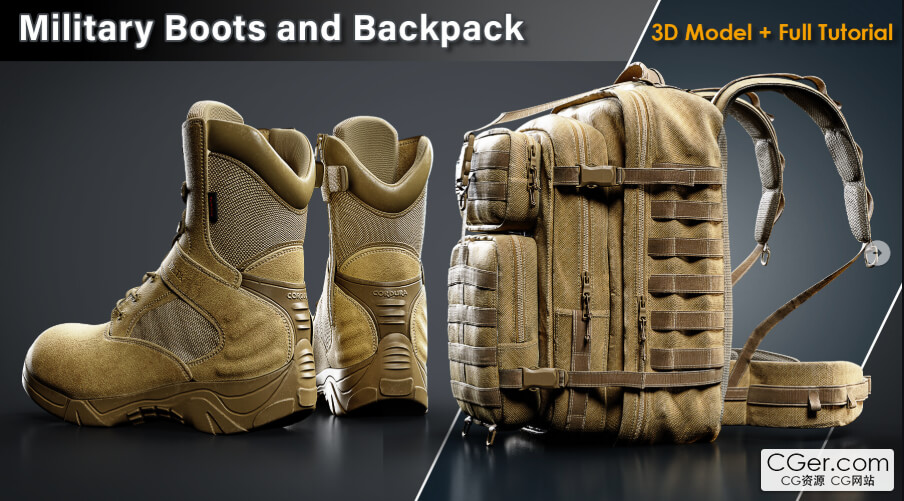
This product contains a complete modeling, texturing, lighting, and rendering tutorial, along with 3D models of military boots and a backpack.
+12 Hours Full Tutorial (Modeling, Unwrapping, Texturing, and Rendering)
(NOTE: The videos are not narrated; they are screen recordings with shortcut displays.)
Game‑Ready Base Mesh
Clean Quad Topology
Unwrapped using a UDIM workflow
4K Textures in PNG (16‑bit)
Software used in this pack:
Marvelous Designer / Blender / Rizom UV / ZBrush / 3Ds Max / Substance Painter / Marmoset Toolbag
Add‑ons used in Blender: Hardops, Cablerator
Plugin used in 3Ds Max: UV Tools 3.2g
No narration
Real‑time tutorial
Screen recording + shortcut display
Tutorial pack contains:
+8 hours Modeling and Retopology Tutorial in 11 parts (Marvelous Designer, Blender, 3Ds Max)
Unwrapping Tutorial in 2 parts (Rizom UV)
Texturing Tutorial in 4 parts (Substance Painter)
Lighting and Rendering in 2 parts (Marmoset Toolbag)
References and extra accessories are located in the tutorial folder.
Tutorial Overview:
Step 1: Creating the base model of the backpack in Marvelous Designer.
Step 2: Packing UVs in RizomUV and preparing the mesh for retopology.
Step 3: Retopology process in ZBrush and 3Ds Max.
Step 4: Re‑unwrapping the model and adding details in Blender.
Step 5: Baking the model in Substance Painter.
Step 6: Texturing process, followed by importing the model into Marmoset Toolbag for lighting and rendering.
描述:
标签: 鞋子 建模 教程分类:教程 > 3D教程 > Blender
发布:CGer | 查看: | 发表时间:2026/6/8 15:51:31 | 更新时间:2026/6/8 15:55:26
○ 充值或账号问题请【点击这里联系站长】 |


点击消耗 10 CG点(约 1.0 元)解锁 30个通用资源, 24小时内有效!(有效期内不重复扣点)



| 常见问题,点击查询: | ||
| ●CGer(Cg儿)资源下载帮助 | ||
| ●资源名词解释 | ||
| ●注册/登陆问题 | ||
| ●充值出错/修改密码/忘记密码 | ||
| ●充值赠送系统 | ||
| ●文件解压出错/解压密码 | ||
| ●Payment with Paypal | ||
| ●哪些资源会被列为付费资源 | ||
| ●为何要充值解锁 | ||
| ●免责条款 | ||
| ●联系站长(联系站长前请先仔细阅读 免责条款 ,网站只提供资源,不提供软件安装等服务!) | ||