Superhive - Blender To Unreal Engine 5 Stylized Interactive Pirate Chest
在 Blender 中建模一个风格化的游戏道具,然后在 Unreal Engine 5 中构建程序化材质和交互式蓝图教程,12.7GB。
您将学到什么
⚡ 在 Blender 5.2 中,从简单形体开始建模一个完整的风格化海盗宝箱,包括木材、金属、皮革、锁具、绑带和装饰部件。
⚡ 使用倒角、修改器、曲线形体和可用的拓扑结构,创建柔和、清晰易读的风格化几何体。
⚡ 创建专用的闭合与打开宝箱变体,直接对箱盖、锁具、绑带、杠杆翻盖和朝内的形体进行艺术控制。
⚡ 对弯曲、镜像和多材质组件进行 UV 展开,同时控制接缝、畸变、密度和木纹方向。
⚡ 使用提供的 Python 工具,在 Blender 中烘焙环境光遮蔽、曲率和空腔遮罩。
⚡ 通过 GLB 和 FBX 工作流程,为 Unreal Engine 5.8 准备并导出两种宝箱状态。
⚡ 在 Unreal Engine 中构建可复用的材质,具有可调节的木材、金属、黄金、老化、磨损、空腔和程序化苔藓控制。
⚡ 创建一个蓝图交互,包含邻近检测、输入、状态追踪、时间轴、缩放动画和精确计时的网格交换。
要求
❗ 一台能够运行 Blender 5.2 和 Unreal Engine 5.8 的计算机。
❗ 已安装并准备好使用 Blender 5.2 和 Unreal Engine 5.8。
❗ 无需具备 Blender 或 Unreal Engine 经验;具备基本的视口导航能力会有帮助,但并非必需。
❗ 愿意暂停课程,跟随讲师一起构建每个阶段,并使用提供的资源包。
描述
一个风格化道具在渲染图中看起来可能已经完成,但在游戏引擎中仍然可能崩溃。不一致的 UV、错位的木纹、僵硬的材质以及穿插的开启动画,都可能让你在模型上投入的努力付诸东流。
这就是本课程要解决的生产问题。
在 44 节课和大约 7.5 小时的时间里,来自 3D Tudor 的 Luke 将带你完成一个完整的从 Blender 到 Unreal Engine 5 的工作流程。你将在 Blender 5.2 中从零开始建模这个海盗宝箱,准备 UV 和生成的遮罩,导出完成的资产,在 Unreal Engine 5.8 中构建可复用的材质,并将其转化为一个动画交互式蓝图。
无需具备 Blender 或 Unreal Engine 经验。每个阶段都通过屏幕上的按键显示逐步展示。初学者可以跟随完整路线,而有经验的艺术家可以快速浏览熟悉的章节,专注于遮罩、材质和交互部分。
从零开始构建一个完整的风格化游戏道具
你将从简单的形体开始,将它们发展为一个坚固、清晰易读的宝箱,具有柔和的边缘、宽大的倒角和清晰的曲率。建模过程涵盖木质箱体和弯曲的箱盖、金属加固件、皮革绑带、锁具、铰链、螺栓、杠杆翻盖以及海盗主题的装饰细节。
大型形状确立剪影,中型形体解释构造,小型细节支撑海盗主题。你将在有帮助的地方使用非破坏性技术,保持拓扑的可用性,并为 UV、导出和蓝图阶段组织资产。
正确设计打开和闭合状态
简单的箱盖旋转可能会导致锁具重叠、绑带穿过箱盖,以及看起来柔性的部件悬垂不当。绑定或物理设置可以解决部分问题,但会给一个专注的风格化道具增加不必要的复杂性。
相反,你将创建专用的闭合和打开版本。这让你能够直接控制箱盖、锁具、绑带、杠杆翻盖和朝内的形体,从而有意识地摆好每个状态。
在 Unreal Engine 5 中,一个简短的缩放动画隐藏了一个精确计时的网格交换。其结果是响应迅速的街机风格过渡,而无需仅靠铰链旋转、骨骼动画或绑带物理,并且这种基于状态的思路可以应用于其他风格化道具。
准备支持材质的 UV、贴花和遮罩
你将对木材、金属、皮革、弯曲部件、镜像组件和多个材质组进行展开,同时控制接缝、拉伸、UV 密度和方向。特别要注意木纹方向,因为一个有效的展开在木纹与构造冲突时仍然可能看起来不对。
海盗主题的贴花增加了可读的表面叙事,而无需将每个徽章都强行放入基础几何体中。你将整理这些装饰元素以供导出,并将它们用作宝箱面向 Nanite 的细节工作流程的一部分。
你还将在 Blender 中生成环境光遮蔽和曲率或空腔数据。一旦在 Unreal Engine 中构建了材质系统,这些遮罩有助于增强接触、凹陷形态、边缘定义、老化和磨损效果。提供的 Python 遮罩烘焙工具让你能够遵循课程中使用的相同准备路线。
从 Blender 干净地迁移到 Unreal Engine 5
导出部分展示了如何组织网格、保留有用的材质分配,并通过 GLB 和 FBX 工作流程传输两种宝箱状态。课程不会承诺神奇的一键交接,而是解释 Unreal Engine 阶段需要什么,以及 Blender 结构应如何支持它。
你将带着清晰的资产层级、可识别的材质组以及独立的打开和闭合网格进入 Unreal Engine,为重建、变化和交互做好准备。
构建可复用的程序化材质
在 Unreal Engine 5.8 中,你将创建可复用的主材质和材质实例,而不是将宝箱锁定在一种完成的外观中。生成的遮罩、环境光遮蔽、曲率、空腔信息和噪波被用来驱动表面,而不是被视为装饰性的附加物。
暴露的参数让你能够实际控制木材颜色、金属响应、黄金处理、边缘定义、凹陷细节、老化、磨损和程序化苔藓。在支持分层材质结果的地方引入了 Substrate 混合。
目标是建立一个你可以进行艺术指导的系统,而不是尽可能大的节点图。同一套设置可以产出一个干净的奖励道具、一个磨损的海盗资产、一个带金色点缀的宝箱,或者一个覆满苔藓的废墟发现物,而无需重新绘制一切。
将宝箱转化为交互式蓝图
最后阶段将美术作品与面向游戏的行为连接起来。你将把打开和闭合网格设置为可切换的状态,检测玩家邻近、接受输入、使用布尔变量跟踪当前状态并进行分支,并通过蓝图时间轴驱动过渡。
一个简短的缩放动作使交互清晰可读,并在最不易察觉的时刻隐藏交换。你将支持打开和关闭,并在一个示例 Unreal Engine 场景中从玩家视角测试完成的宝箱。
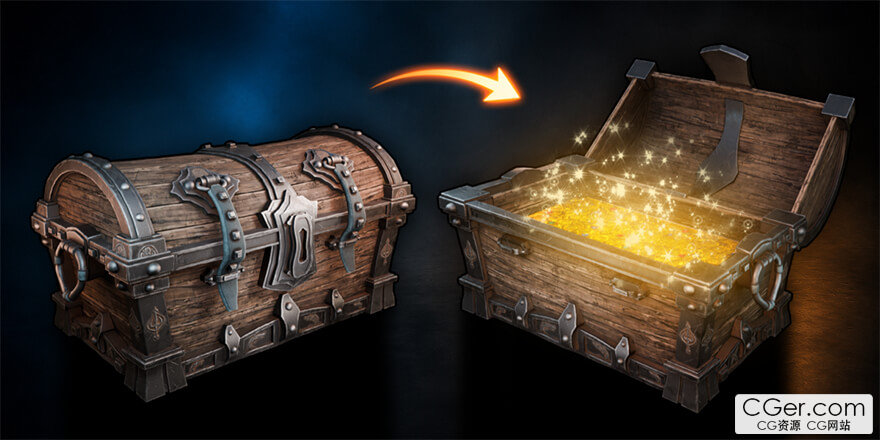
Model a stylized game prop in Blender, then build procedural Unreal Engine 5 materials and an interactive Blueprint
What you'll learn
⚡ Model a complete stylized pirate chest from simple forms in Blender 5.2, including wood, metal, leather, locks, straps, and decorative parts.
⚡ Use bevels, modifiers, curved forms, and workable topology to create soft, readable stylized geometry.
⚡ Create dedicated closed and open chest variants with direct artistic control over the lid, lock, straps, lever flaps, and interior‑facing forms.
⚡ UV unwrap curved, mirrored, and multi‑material components while controlling seams, distortion, density, and wood‑grain direction.
⚡ Bake ambient occlusion, curvature, and cavity masks in Blender using the supplied Python utility.
⚡ Prepare and export both chest states through GLB and FBX workflows for Unreal Engine 5.8.
⚡ Build reusable Unreal Engine materials with adjustable wood, metal, gold, ageing, wear, cavity, and procedural moss controls.
⚡ Create a Blueprint interaction with proximity detection, input, state tracking, a timeline, scaling animation, and a precisely timed mesh swap.
Requirements
❗ A computer capable of running Blender 5.2 and Unreal Engine 5.8.
❗ Blender 5.2 and Unreal Engine 5.8 installed and ready to use.
❗ No previous Blender or Unreal Engine experience is required; basic viewport navigation is helpful but not necessary.
❗ A willingness to pause the lessons, build each stage alongside the instructor, and use the supplied resource pack.
Description
A stylized prop can look finished in a render and still fall apart in a game engine. Inconsistent UVs, misplaced wood grain, rigid materials, and a clipping opening animation can all undo the work you put into the model.
That is the production problem this course solves.
Across 44 lessons and approximately 7.5 hours, Luke from 3D Tudor takes you through one complete Blender‑to‑Unreal Engine 5 workflow. You will model the pirate chest from scratch in Blender 5.2, prepare the UVs and generated masks, export the finished asset, build reusable materials in Unreal Engine 5.8, and turn it into an animated interactive Blueprint.
No previous Blender or Unreal Engine experience is required. Every stage is shown step by step with on‑screen key displays. Beginners can follow the full route, while experienced artists can move quickly through familiar sections and focus on masks, materials, and interaction.
Build a Complete Stylized Game Prop from Scratch
You will begin with simple forms and develop them into a strong, readable treasure chest with soft edges, broad bevels, and clear curvature. The build covers the wooden body and curved lid, metal reinforcement, leather straps, locks, hinges, bolts, lever flaps, and pirate‑themed decorative details.
Large shapes establish the silhouette, medium forms explain construction, and small details support the pirate theme. You will use non‑destructive techniques where they help, keep the topology workable, and organise the asset for the UV, export, and Blueprint stages.
Design the Open and Closed States Properly
A simple lid rotation can make the lock overlap, the straps pass through the lid, and flexible‑looking parts hang badly. A rig or physics setup could solve some of this, but it would add unnecessary complexity to a focused stylized prop.
Instead, you will create dedicated closed and open versions. This gives you direct control over the lid, lock, straps, lever flaps, and interior‑facing forms, allowing each state to be posed deliberately.
In Unreal Engine 5, a short scaling animation hides a precisely timed mesh swap. The result is a responsive arcade‑style transition without a hinge‑only rotation, skeletal animation, or strap physics, and the same state‑based idea can be adapted to other stylized props.
Prepare UVs, Decals, and Masks That Support the Materials
You will unwrap wood, metal, leather, curved parts, mirrored components, and multiple material groups while controlling seams, stretching, UV density, and orientation. Particular attention goes to wood‑grain direction, because a valid unwrap can still look wrong when the grain fights the construction.
Pirate‑themed decals add readable surface storytelling without forcing every emblem into the base geometry. You will organise these decorative elements for export and use them as part of the chest's Nanite‑oriented detail workflow.
You will also generate ambient occlusion and curvature or cavity data in Blender. These masks help strengthen contact, recessed forms, edge definition, ageing, and wear once the material system is built in Unreal Engine. A supplied Python mask‑baking utility lets you follow the same preparation route used in the lessons.
Move Cleanly from Blender to Unreal Engine 5
The export section shows how to organise the meshes, preserve useful material assignments, and transfer both chest states through GLB and FBX workflows. Rather than promising a magical one‑click hand‑off, the course explains what the Unreal Engine stage needs and how the Blender structure should support it.
You will arrive in Unreal Engine with a clear asset hierarchy, recognisable material groups, and separate open and closed meshes that are ready for reconstruction, variation, and interaction.
Build Procedural Materials You Can Reuse
In Unreal Engine 5.8, you will create reusable master materials and material instances instead of locking the chest into one finished look. Generated masks, ambient occlusion, curvature, cavity information, and noise are used to drive the surface rather than being treated as decorative extras.
Exposed parameters give you practical control over wood colour, metal response, gold treatments, edge definition, recessed detail, ageing, wear, and procedural moss. Substrate blending is introduced where it supports the layered material result.
The goal is a system you can art‑direct, not the largest possible node graph. The same setup can produce a clean reward prop, a worn pirate asset, a gold‑accented chest, or a moss‑covered ruin find without repainting everything.
Turn the Chest into an Interactive Blueprint
The final stage connects the artwork to game‑facing behaviour. You will set up the open and closed meshes as switchable states, detect player proximity, accept input, track the current state with a Boolean variable and branch, and drive the transition with a Blueprint timeline.
A brief scaling motion makes the interaction readable and hides the swap at the least noticeable point. You will support opening and closing, then test the finished chest from the player view in an example Unreal Engine scene.
描述:
标签: blender ue 建模 渲染 动画 教程 虚幻 引擎分类:教程 > 3D教程 > Blender
发布:CGer | 查看: | 发表时间:2026/9/10 21:44:00 | 更新时间:2026/9/10 21:44:00
○ 充值或账号问题请【点击这里联系站长】 |


点击解锁当前付费资源,消耗 30 CG 点(约3.0 元), 24小时内有效(有效期内不重复扣点)
—————————————————————————————————————————————— | ||
| 哪些资源会被列为付费资源? ●站长付费购买的资源,站长从其他途径付费购买的资源。 ●资源包体积巨大,需要大量时间上传,占用大量存储空间的资源。(目前超过10GB的资源可能会列为付费资源) ●内容经常被某些人倒卖并恶意举报的资源,收费可以减少恶意举报的概率。 ●稀少的和高质量的资源。 |
| 常见问题,点击查询: | ||
| ●CGer(Cg儿)资源下载帮助 | ||
| ●资源名词解释 | ||
| ●注册/登陆问题 | ||
| ●充值出错/修改密码/忘记密码 | ||
| ●充值赠送系统 | ||
| ●文件解压出错/解压密码 | ||
| ●Payment with Paypal | ||
| ●哪些资源会被列为付费资源 | ||
| ●为何要充值解锁 | ||
| ●免责条款 | ||
| ●联系站长(联系站长前请先仔细阅读 免责条款 ,网站只提供资源,不提供软件安装等服务!) | ||